The Best Ticket Is the One You Never Receive Again

Constant reactive IT keeps small teams busy but never ahead. Here's why the cycle forms, what it actually costs, and how managers with lean teams start reclaiming time for the work that matters.
In this article:
The Cycle Reactive IT Creates
What Constant Firefighting Actually Costs
What Recurring Tickets Are Really Telling You
The Band-Aid Trap: Why Quick Fixes Cost More Later
Prioritization, Documentation, and Automation
Structural Firebreaks: A Fix Beyond Habits
Small Changes That Reclaim Time for Strategic Work
Your Next Move
Ask any IT manager with a lean team what's stopping them from getting ahead, and you'll hear some version of the same answer: there's no time. Not because the team isn't capable. Because every hour that should go toward planning, documentation, or infrastructure work gets pulled into the next fire.
For teams running with two to ten technicians, this isn't a scheduling problem. It's a structural one, and it has a structural fix. This article is built around that fix: five concrete moves you can make this month to redirect time away from repeat fires and toward the work that actually reduces them. None of them require a technician to sit down and audit anything. If your team had a spare afternoon to pull reports, you wouldn't be reading this article.
The Cycle Reactive IT Creates
Reactive IT feels productive in the moment. Tickets close, users get unblocked, the queue empties out for a few hours. But a pattern hides underneath it: the same handful of issues keep coming back, just wearing different ticket numbers. A password reset today is a locked account next week. A slow laptop today is a replacement request in a month. Each incident gets treated as its own isolated event, with no time built in to ask why it happened or whether it will happen again.
The cycle breaks at a specific, findable point, and it's not by working faster. It's by redirecting a small amount of time toward the handful of issues doing most of the damage, which is exactly what the rest of this article walks through.
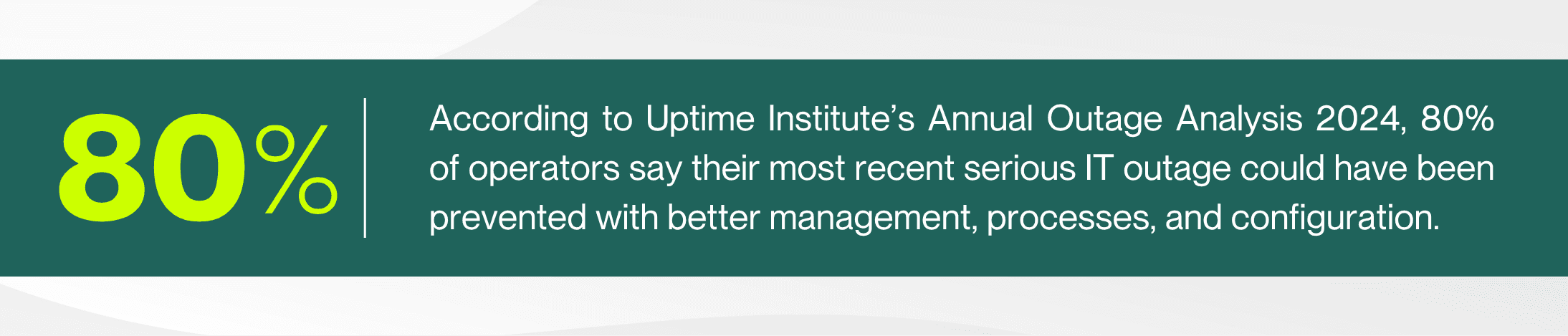
Most of what IT teams scramble to fix wasn't inevitable. It was preventable, and prevention takes exactly the kind of time reactive environments never have.
What Constant Firefighting Actually Costs
The cost of reactive IT rarely shows up on a single line item, which is part of why leadership underestimates it. It shows up in overtime, technician turnover, delayed projects, and moments when a "temporary" fix finally gives out. It also shows up in hard financial terms when systems go down entirely, which is where sustained firefighting eventually leads.
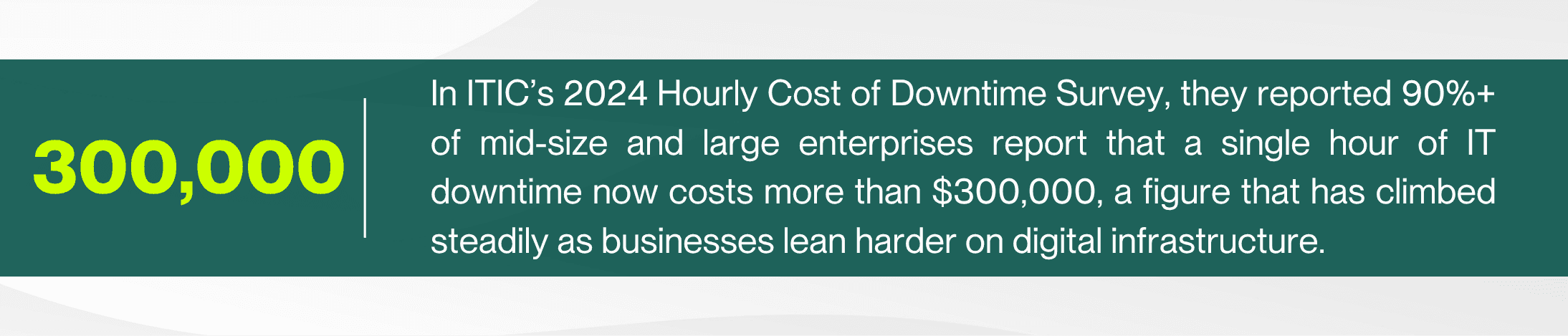
Smaller organizations feel a proportionally different version of the same pain. A four-hour outage won't carry a six-figure price tag for a 40-person company, but it can still mean a full day of lost productivity and a technician team spending the next week on recovery instead of anything proactive. The dollar figure changes with size. The underlying dynamic doesn't.
Leadership pressure tends to intensify this dynamic: the instruction after something breaks is almost always "fix it now," rarely paired with "and make sure it doesn't happen again." That's a visibility gap more than a leadership failure. Bringing ticket trend data into that conversation, instead of just a status update, is what actually wins back time for root-cause work.
What Recurring Tickets Are Really Telling You
Every help desk has a set of tickets that feel familiar the moment they land. The same printer. The same VPN drop. The same application crash after a specific update. These aren't just annoying. They're data, and most teams under-use it, not because the data is hard to get, but because nobody's ever asked for it out loud.
Here's the part that gets missed: your technicians already know which tickets are repeat offenders. They don't need a report to tell them. They've lived it. The insight isn't buried in a system somewhere waiting to be extracted. It's sitting in whoever answered the phone last time, and the time before that. The gap isn't data collection, it's that nobody's written it down.
<5% is the target ticket reopen rate for a well-run service desk. Anything above 10% signals a systemic issue, usually a root cause that keeps getting patched instead of fixed. ScreenMeet, IT Help Desk Metrics 2026
If your team isn't tracking reopen rates or repeat-issue categories yet, that's usually a sign that ticketing data gets treated as a record of work completed, not a source of insight. The shift that actually breaks the cycle isn't a bigger reporting effort. It's a single new habit: after closing a ticket, ask "have I seen this exact issue before?" and note it if the answer is yes. That question takes five seconds and needs no report pulled to answer it.
The Band-Aid Trap: Why Quick Fixes Cost More Later
Anyone who has spent time on a frontline support desk knows the frustration of a "temporary" fix that becomes permanent by accident. A workaround gets applied under pressure, the ticket closes, and everyone moves on to the next fire. Nobody schedules time to circle back, because circling back isn't urgent. It's important, and in a reactive environment, important almost always loses to urgent.
The problem is that these workarounds don't disappear. They accumulate quietly underneath the systems a team relies on every day, and each one is a small decision that made sense in the moment. Together, they become technical debt that eventually collapses, usually without warning.
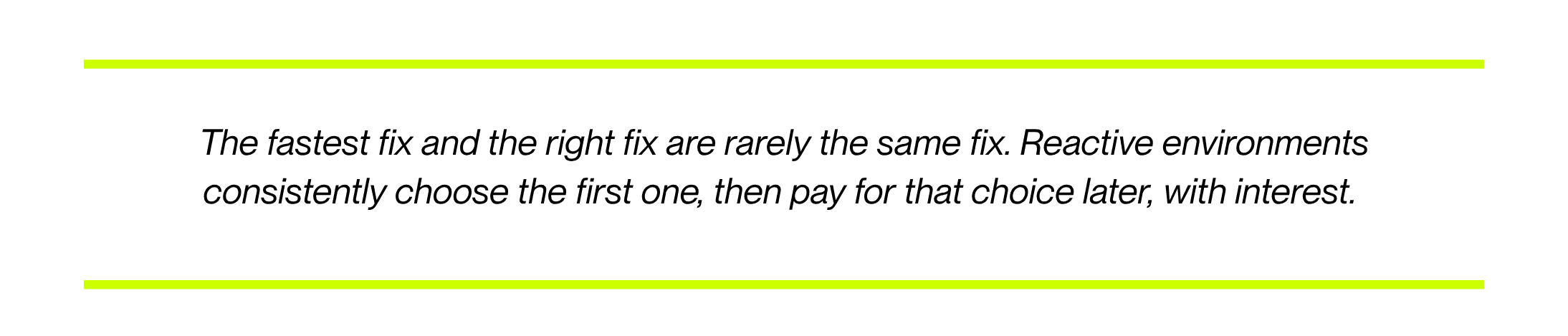
The fix isn't to slow every ticket down. It's to flag which fixes are workarounds the moment they're applied, so they land on a short, visible list instead of disappearing into the queue. A simple tag in the ticketing system, "temporary fix, needs follow-up," is enough to start. What matters is that the list gets reviewed on a schedule, not left to memory.
Band-Aid Approach | Root-Cause Approach |
Same issue resolved repeatedly, never eliminated | Issue investigated once, resolved permanently |
Fix isn't documented, so knowledge lives in one person's head | Fix documented and searchable for the whole team |
Underlying cause resurfaces, often worse than before | Ticket volume for that issue drops for good |
Technician time spent on the same problem, over and over | Technician time freed up for higher-value work |
Failure eventually happens without warning | Failure risk is identified and managed proactively |
None of this means every fix needs a full rebuild on the spot. It means recurring issues need a second pass, on a schedule, where the goal is making sure it's the last time that ticket needs to exist. That shift alone often separates a team that's always behind from one that's steadily getting ahead. It also tends to show up in how a ticket gets communicated, not just how it gets fixed. As Silence Is a Status Update lays out, a ticket that's gone quiet for days is often the same ticket masking a repeat issue nobody has flagged yet.
Prioritization, Documentation, and Automation: The Proactive Toolkit
Breaking the cycle doesn't require a bigger team or a bigger budget, though both help. It requires a deliberate shift in how the existing team spends its time, built around three habits.
Prioritization that separates urgent from important Reactive teams treat every ticket the same way: first in, first out. A simple fix is a triage tag, urgent, important, both, or neither, with weekly time protected for important-but-not-urgent work so it stops losing to whatever's loudest. Pair that with a written escalation threshold, a clear answer to what needs your most experienced technician versus what a newer hire can own. Without one, every unclear ticket defaults upward and your best people spend their day compensating for gaps, a pattern When Escalation Becomes the System covers in more depth. De-escalation techniques help here too, since a technician who can calm a heated user recovers time an extended call would otherwise cost. Start by adding one triage field this week and reviewing it every Friday.
Documentation that turns individual knowledge into team knowledge When only one technician knows how a system was actually fixed, every future incident depends on that person being available. Documentation converts a one-time fix into a permanent asset. Start with a single shared doc, and make one rule non-negotiable: any fix applied to a recurring issue gets written down before the ticket closes, not after.
Automation that removes the repetitive first Automation doesn't need to be sophisticated. Password reset self-service, automated alerts before a disk fills up, scripted onboarding steps. These are the highest-leverage places to start, since they remove volume from the queue without a technician involved at all. Pick your single highest-volume, lowest-complexity ticket type and automate that one first.
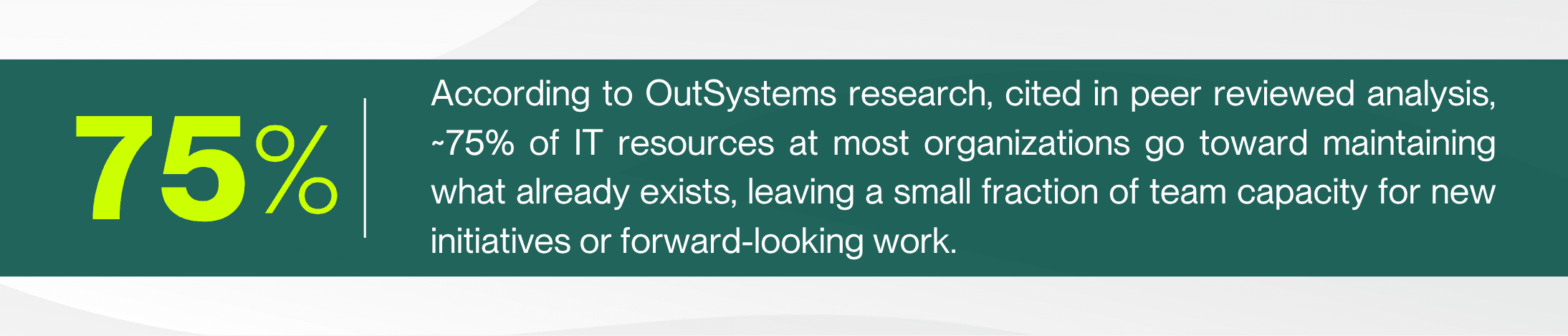
That number is a useful gut check for any manager building a case to leadership. If three-quarters of the team's time is already spoken for before a single strategic project begins, the problem isn't a lack of ambition. It's a lack of protected capacity, and that's a resourcing conversation, not a motivational one.
Structural Firebreaks: A Fix Beyond Habits
Prioritization, documentation, and automation are habits, and habits depend on people remembering to apply them on a hard day. What makes the shift stick is pairing those habits with something more durable: structural boundaries that keep one bad day from pulling the whole team into reactive mode at once. Helpt's deeper breakdown, The Path to Proactive Maturity, calls these operational firebreaks. Three worth building first:
Dedicated intake ownership. One technician owns the incoming queue during your highest-volume window so the rest of the team stays heads-down on planned work instead of everyone splitting attention across both.
Protected project blocks. A 90-minute window on the team calendar, treated with the same weight as an SLA commitment, reserved for infrastructure and root-cause work that never survives an open queue.
Written escalation thresholds. Specific criteria for what needs senior involvement, so routing decisions aren't made in the moment, under pressure, by whoever happens to be closest.
None of these require new headcount. They require deciding, in advance, how the team absorbs pressure instead of figuring it out fresh every time something breaks.
Small Changes That Reclaim Time for Strategic Work
Start small, prove the model works with one issue, then expand from there. Notice none of these ask anyone to stop and audit anything. They fit inside the work already happening.
Ask each tech one question at your next standup: what ticket are you tired of seeing? Two minutes, no report. Your team already knows the answer, they've just never been asked out loud.
Start a running list, not a report. Every time a tech closes a ticket they recognize, they add one line to a shared doc. The list builds itself over two or three weeks with zero dedicated time spent.
Assign one recurring issue per week to a root-cause fix. Pull from the running list once it has a few entries. Small and sustainable beats an ambitious plan that never gets scheduled.
Automate one repetitive request this quarter. Start with the highest-volume, lowest-complexity ticket type your team already knows by heart.
Protect a weekly block of time explicitly labeled proactive. If it's not on the calendar, it will always lose to whatever's urgent that day.
Bring the list to leadership, not a data project. A handwritten list of the three tickets your team is tired of seeing makes the case for protected time as well as any formal report, and it costs nothing to produce.
The point isn't to eliminate reactive work entirely. Support desks will always handle unplanned issues, and that's fine. The point is to stop 100% of the team's time from being consumed by it, one recurring issue and one protected hour at a time.
Your Next Move
Reactive IT isn't a character flaw or a sign of a weak team. It's what happens by default without a deliberate mechanism pulling time toward prevention. Fixing it doesn't require solving everything at once, and it definitely doesn't require a data project a reactive team has no time to run. It starts with one question, asked out loud: which ticket has shown up before?
About the Author

Michelle Burnham has worked in and around the technology industry for nearly a decade; collaborating with IT support teams and contributing to technical documentation, service-oriented content, and operational communications. With a background in editing, formatting, and visual design, she specializes in translating complex ideas into clear, engaging content. In addition to her freelance creative work, she serves as a contract graphic designer, copywriter, and video editor for Helpt.
Constant reactive IT keeps small teams busy but never ahead. Here's why the cycle forms, what it actually costs, and how managers with lean teams start reclaiming time for the work that matters.
In this article:
The Cycle Reactive IT Creates
What Constant Firefighting Actually Costs
What Recurring Tickets Are Really Telling You
The Band-Aid Trap: Why Quick Fixes Cost More Later
Prioritization, Documentation, and Automation
Structural Firebreaks: A Fix Beyond Habits
Small Changes That Reclaim Time for Strategic Work
Your Next Move
Ask any IT manager with a lean team what's stopping them from getting ahead, and you'll hear some version of the same answer: there's no time. Not because the team isn't capable. Because every hour that should go toward planning, documentation, or infrastructure work gets pulled into the next fire.
For teams running with two to ten technicians, this isn't a scheduling problem. It's a structural one, and it has a structural fix. This article is built around that fix: five concrete moves you can make this month to redirect time away from repeat fires and toward the work that actually reduces them. None of them require a technician to sit down and audit anything. If your team had a spare afternoon to pull reports, you wouldn't be reading this article.
The Cycle Reactive IT Creates
Reactive IT feels productive in the moment. Tickets close, users get unblocked, the queue empties out for a few hours. But a pattern hides underneath it: the same handful of issues keep coming back, just wearing different ticket numbers. A password reset today is a locked account next week. A slow laptop today is a replacement request in a month. Each incident gets treated as its own isolated event, with no time built in to ask why it happened or whether it will happen again.
The cycle breaks at a specific, findable point, and it's not by working faster. It's by redirecting a small amount of time toward the handful of issues doing most of the damage, which is exactly what the rest of this article walks through.
Most of what IT teams scramble to fix wasn't inevitable. It was preventable, and prevention takes exactly the kind of time reactive environments never have.
What Constant Firefighting Actually Costs
The cost of reactive IT rarely shows up on a single line item, which is part of why leadership underestimates it. It shows up in overtime, technician turnover, delayed projects, and moments when a "temporary" fix finally gives out. It also shows up in hard financial terms when systems go down entirely, which is where sustained firefighting eventually leads.
Smaller organizations feel a proportionally different version of the same pain. A four-hour outage won't carry a six-figure price tag for a 40-person company, but it can still mean a full day of lost productivity and a technician team spending the next week on recovery instead of anything proactive. The dollar figure changes with size. The underlying dynamic doesn't.
Leadership pressure tends to intensify this dynamic: the instruction after something breaks is almost always "fix it now," rarely paired with "and make sure it doesn't happen again." That's a visibility gap more than a leadership failure. Bringing ticket trend data into that conversation, instead of just a status update, is what actually wins back time for root-cause work.
What Recurring Tickets Are Really Telling You
Every help desk has a set of tickets that feel familiar the moment they land. The same printer. The same VPN drop. The same application crash after a specific update. These aren't just annoying. They're data, and most teams under-use it, not because the data is hard to get, but because nobody's ever asked for it out loud.
Here's the part that gets missed: your technicians already know which tickets are repeat offenders. They don't need a report to tell them. They've lived it. The insight isn't buried in a system somewhere waiting to be extracted. It's sitting in whoever answered the phone last time, and the time before that. The gap isn't data collection, it's that nobody's written it down.
<5% is the target ticket reopen rate for a well-run service desk. Anything above 10% signals a systemic issue, usually a root cause that keeps getting patched instead of fixed. ScreenMeet, IT Help Desk Metrics 2026
If your team isn't tracking reopen rates or repeat-issue categories yet, that's usually a sign that ticketing data gets treated as a record of work completed, not a source of insight. The shift that actually breaks the cycle isn't a bigger reporting effort. It's a single new habit: after closing a ticket, ask "have I seen this exact issue before?" and note it if the answer is yes. That question takes five seconds and needs no report pulled to answer it.
The Band-Aid Trap: Why Quick Fixes Cost More Later
Anyone who has spent time on a frontline support desk knows the frustration of a "temporary" fix that becomes permanent by accident. A workaround gets applied under pressure, the ticket closes, and everyone moves on to the next fire. Nobody schedules time to circle back, because circling back isn't urgent. It's important, and in a reactive environment, important almost always loses to urgent.
The problem is that these workarounds don't disappear. They accumulate quietly underneath the systems a team relies on every day, and each one is a small decision that made sense in the moment. Together, they become technical debt that eventually collapses, usually without warning.
The fix isn't to slow every ticket down. It's to flag which fixes are workarounds the moment they're applied, so they land on a short, visible list instead of disappearing into the queue. A simple tag in the ticketing system, "temporary fix, needs follow-up," is enough to start. What matters is that the list gets reviewed on a schedule, not left to memory.
Band-Aid Approach | Root-Cause Approach |
Same issue resolved repeatedly, never eliminated | Issue investigated once, resolved permanently |
Fix isn't documented, so knowledge lives in one person's head | Fix documented and searchable for the whole team |
Underlying cause resurfaces, often worse than before | Ticket volume for that issue drops for good |
Technician time spent on the same problem, over and over | Technician time freed up for higher-value work |
Failure eventually happens without warning | Failure risk is identified and managed proactively |
None of this means every fix needs a full rebuild on the spot. It means recurring issues need a second pass, on a schedule, where the goal is making sure it's the last time that ticket needs to exist. That shift alone often separates a team that's always behind from one that's steadily getting ahead. It also tends to show up in how a ticket gets communicated, not just how it gets fixed. As Silence Is a Status Update lays out, a ticket that's gone quiet for days is often the same ticket masking a repeat issue nobody has flagged yet.
Prioritization, Documentation, and Automation: The Proactive Toolkit
Breaking the cycle doesn't require a bigger team or a bigger budget, though both help. It requires a deliberate shift in how the existing team spends its time, built around three habits.
Prioritization that separates urgent from important Reactive teams treat every ticket the same way: first in, first out. A simple fix is a triage tag, urgent, important, both, or neither, with weekly time protected for important-but-not-urgent work so it stops losing to whatever's loudest. Pair that with a written escalation threshold, a clear answer to what needs your most experienced technician versus what a newer hire can own. Without one, every unclear ticket defaults upward and your best people spend their day compensating for gaps, a pattern When Escalation Becomes the System covers in more depth. De-escalation techniques help here too, since a technician who can calm a heated user recovers time an extended call would otherwise cost. Start by adding one triage field this week and reviewing it every Friday.
Documentation that turns individual knowledge into team knowledge When only one technician knows how a system was actually fixed, every future incident depends on that person being available. Documentation converts a one-time fix into a permanent asset. Start with a single shared doc, and make one rule non-negotiable: any fix applied to a recurring issue gets written down before the ticket closes, not after.
Automation that removes the repetitive first Automation doesn't need to be sophisticated. Password reset self-service, automated alerts before a disk fills up, scripted onboarding steps. These are the highest-leverage places to start, since they remove volume from the queue without a technician involved at all. Pick your single highest-volume, lowest-complexity ticket type and automate that one first.
That number is a useful gut check for any manager building a case to leadership. If three-quarters of the team's time is already spoken for before a single strategic project begins, the problem isn't a lack of ambition. It's a lack of protected capacity, and that's a resourcing conversation, not a motivational one.
Structural Firebreaks: A Fix Beyond Habits
Prioritization, documentation, and automation are habits, and habits depend on people remembering to apply them on a hard day. What makes the shift stick is pairing those habits with something more durable: structural boundaries that keep one bad day from pulling the whole team into reactive mode at once. Helpt's deeper breakdown, The Path to Proactive Maturity, calls these operational firebreaks. Three worth building first:
Dedicated intake ownership. One technician owns the incoming queue during your highest-volume window so the rest of the team stays heads-down on planned work instead of everyone splitting attention across both.
Protected project blocks. A 90-minute window on the team calendar, treated with the same weight as an SLA commitment, reserved for infrastructure and root-cause work that never survives an open queue.
Written escalation thresholds. Specific criteria for what needs senior involvement, so routing decisions aren't made in the moment, under pressure, by whoever happens to be closest.
None of these require new headcount. They require deciding, in advance, how the team absorbs pressure instead of figuring it out fresh every time something breaks.
Small Changes That Reclaim Time for Strategic Work
Start small, prove the model works with one issue, then expand from there. Notice none of these ask anyone to stop and audit anything. They fit inside the work already happening.
Ask each tech one question at your next standup: what ticket are you tired of seeing? Two minutes, no report. Your team already knows the answer, they've just never been asked out loud.
Start a running list, not a report. Every time a tech closes a ticket they recognize, they add one line to a shared doc. The list builds itself over two or three weeks with zero dedicated time spent.
Assign one recurring issue per week to a root-cause fix. Pull from the running list once it has a few entries. Small and sustainable beats an ambitious plan that never gets scheduled.
Automate one repetitive request this quarter. Start with the highest-volume, lowest-complexity ticket type your team already knows by heart.
Protect a weekly block of time explicitly labeled proactive. If it's not on the calendar, it will always lose to whatever's urgent that day.
Bring the list to leadership, not a data project. A handwritten list of the three tickets your team is tired of seeing makes the case for protected time as well as any formal report, and it costs nothing to produce.
The point isn't to eliminate reactive work entirely. Support desks will always handle unplanned issues, and that's fine. The point is to stop 100% of the team's time from being consumed by it, one recurring issue and one protected hour at a time.
Your Next Move
Reactive IT isn't a character flaw or a sign of a weak team. It's what happens by default without a deliberate mechanism pulling time toward prevention. Fixing it doesn't require solving everything at once, and it definitely doesn't require a data project a reactive team has no time to run. It starts with one question, asked out loud: which ticket has shown up before?
About the Author
Michelle Burnham has worked in and around the technology industry for nearly a decade; collaborating with IT support teams and contributing to technical documentation, service-oriented content, and operational communications. With a background in editing, formatting, and visual design, she specializes in translating complex ideas into clear, engaging content. In addition to her freelance creative work, she serves as a contract graphic designer, copywriter, and video editor for Helpt.
Stop Answering Calls.
Start Driving Growth.
Let Helpt's US-based technicians handle your support calls 24x7 while your team focuses on what matters most.
Stop Answering Calls.
Start Driving Growth.
Let Helpt's US-based technicians handle your support calls 24x7 while your team focuses on what matters most.
Stop Answering Calls.
Start Driving Growth.
Let Helpt's US-based technicians handle your support calls 24x7 while your team focuses on what matters most.
©2026 Helpt, a part of PAG Technology Inc. All Rights Reserved.