The 99.9% of IT Nobody Notices: How Small Teams Get Ahead

Leadership keeps asking IT to be more proactive. For a team already buried in tickets, here's a lower-effort way to start: make the work you're already doing visible.
IN THIS ARTICLE
The Field Goal Kicker Problem
Make the Work You're Already Doing Visible
Show Progress Before It's Finished
Say the Idea Out Loud Before You Build It
Do It Once So You Don't Have to Keep Doing It
Give Leadership Something to Prioritize
Find the Work Your Team Can Stop Doing
"Be more proactive" is easy for leadership to ask for and hard for a small IT team to schedule. When tickets keep coming and the next urgent issue is always waiting, adding proactive work to the pile can feel like one more thing nobody has time for.
But proactive IT doesn't have to start with a new project. For a lean team, a better place to begin is with the work already happening: make progress easier to see, surface problems sooner, test ideas before investing heavily in them, and find recurring work the team can eliminate altogether.
That idea came up in a recent episode of The Cool Kids Table Podcast, when Joe Alapat, Founder and Chief Strategy Officer of Liongard, described a principle he calls visible progress: when people can't see that something is happening, they assume nothing is.
For a small IT team, visible progress isn't just about getting credit. It can help leadership make better decisions, expose blockers earlier, and create room for the work that keeps getting pushed aside by the next urgent ticket.
Here's how to put it into practice without adding another meeting or reporting process to the calendar.
The Field Goal Kicker Problem
Joe has a name for the position IT is often stuck in: the field goal kicker job. You make the kick every single time, and the one time you miss, that's all anyone remembers.
"You gotta kick it through the uprights every time, and the moment it doesn't, everyone's like, 'Oh my God, what are these IT guys doing?' There's no appreciation for the 99.9% of the time when things were running well."
That's the trap reactive IT teams get stuck in. Nobody notices the work required to keep things running, only the moment something doesn't. When the work behind that 99.9% stays invisible, "be more proactive" can start to sound like an accusation instead of a strategy.
The answer isn't to work harder. It's to make sure the work already happening doesn't disappear from view.
Make the Work You're Already Doing Visible
Start with information your team already has.
Ticket dashboards, project trackers, monitoring platforms, roadmaps, and documentation already contain plenty of evidence that work is moving forward. The problem is that the people making decisions about IT priorities often aren't seeing it.
Consider a three-month migration. If stakeholders hear about it when the project begins and again when it's finished, there are nearly three months where the work is effectively invisible to everyone outside IT.
That doesn't mean creating a weekly migration report.
If the tracker already shows completed milestones, share the view. If the ticket dashboard shows a recurring issue trending down, point it out. If testing uncovered a blocker that could affect the timeline, surface it while someone can still do something about it.
BEFORE YOU CREATE ANOTHER REPORT, ASK:
Where does this information already exist?
Ticketing system
Project tracker
Monitoring platform
Documentation
Roadmap
Existing team dashboard
Then ask: Who would make a better decision if they could see it?
The goal isn't more reporting. It's less information trapped inside IT.
25% of the average workweek goes to employees and executives simply searching for information they need but can't easily find, according to Atlassian's State of Teams research.
For a small IT team, that lost time shows up in more than searching. It's the technician answering another "where are we on this?" message, the manager reconstructing project status for leadership, and the stakeholder asking a question the existing tracker could have answered.
Show Progress Before It's Finished
It's tempting to wait until something is polished before letting anyone else see it. Joe argues for the opposite. Visible progress can be as simple as sharing a raw spreadsheet. It doesn't need to be the finished outcome. It needs to show what has changed and where the work is headed.
That matters especially for long-running IT initiatives because an update can do more than reassure leadership. It can surface information IT doesn't have.
SAME PROJECT. VERY DIFFERENT UPDATE.
Instead of:
"We're still working on the migration."
Try:
"42 of 100 devices have been migrated. We found two legacy application dependencies during testing and we're resolving those before moving the next group."
The second version gives stakeholders something useful to respond to. Someone may know about another dependency. A department may have a deadline IT wasn't aware of. Leadership may want one group prioritized over another.
The team hasn't created more work by sharing the update. It has created an opportunity to catch a problem while there's still time to change course.
THE FOUR-QUESTION UPDATE
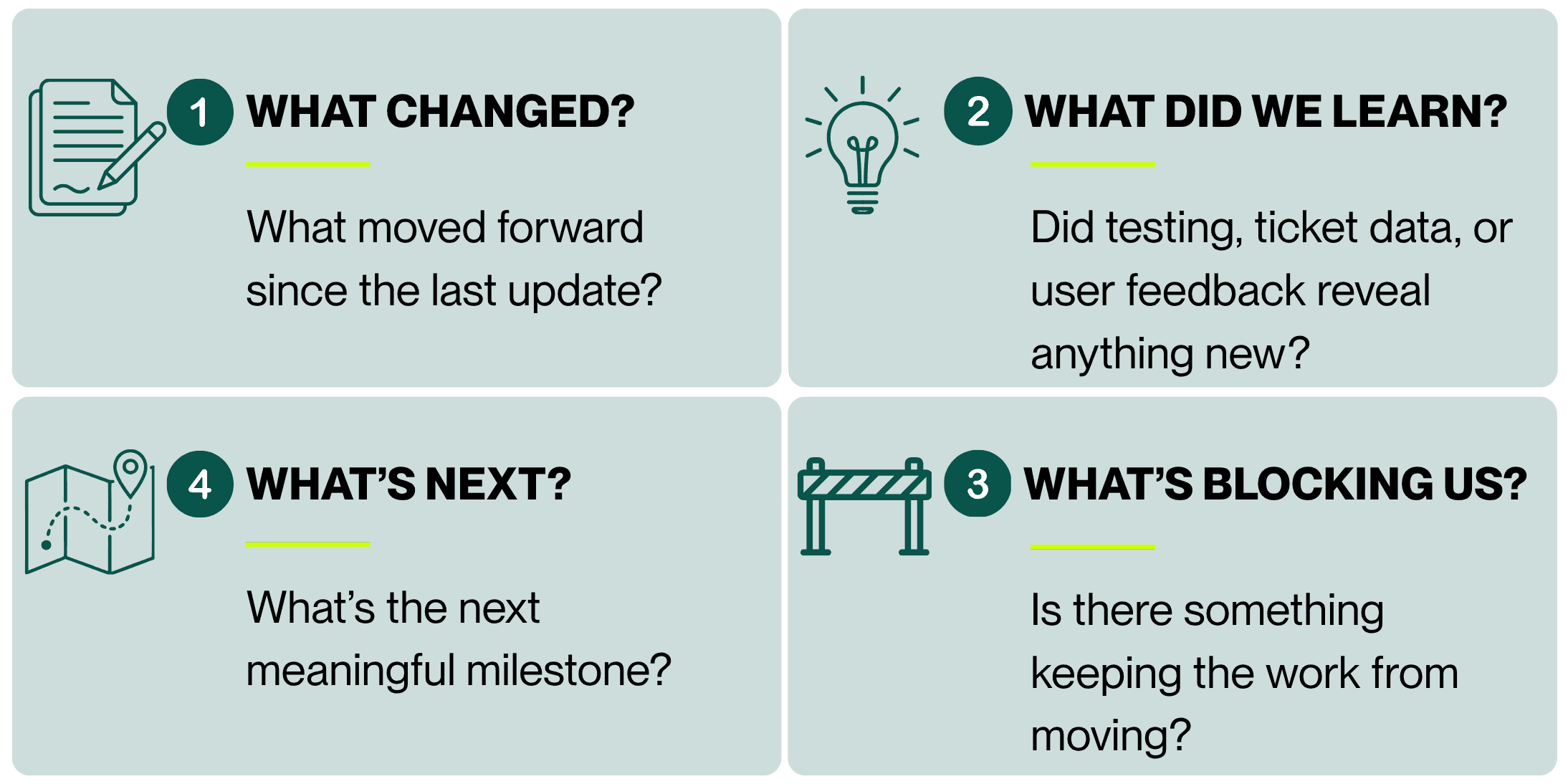
If those answers already exist in the team's normal workflow, the update should take minutes, not hours.
Say the Idea Out Loud Before You Build It
Another idea from Joe's conversation is especially useful for small teams: say the hypothesis out loud before investing heavily in the solution. Talking through an idea gives the people listening a chance to challenge it early, while it's still cheap to change course.
"If you can say it out loud, then you're really testing it, and those that are listening can tell you, 'Whoa, that didn't make any sense.' Maybe I've jumped to a conclusion here. You have to be able to iterate it. It's a hypothesis."
Suppose an IT manager sees a spike in application tickets and assumes the problem is a training gap. The proactive response might seem obvious: build training.
Before spending weeks creating a training program, look at the ticket patterns. Ask frontline technicians what they're seeing. Talk to a handful of affected users. Test a short training session with one department and see whether the issue changes.
You may discover the problem isn't training at all. Maybe the workflow is confusing. Maybe permissions aren't configured correctly. Maybe documentation is outdated. Maybe a recent application change created the spike.
BEFORE YOU BUILD THE SOLUTION, ASK:
What do we think is happening?
State the hypothesis clearly.
What evidence would prove or disprove it?
Look at tickets, monitoring data, technician feedback, or user behavior.
What's the smallest way we can test it?
Try the change with one group, one workflow, or one recurring issue before scaling it.
Proactive IT doesn't require predicting everything correctly. It requires finding out sooner when you're wrong.
Do It Once So You Don't Have to Keep Doing It
Making work visible is only part of the equation. If every proactive initiative gets layered on top of the existing workload, a small team eventually runs out of room.
The better question is: what work can we remove?
Look at the things technicians repeatedly handle by hand and ask whether one change could prevent some of that work from coming back. That could mean automating a repetitive request, documenting a recurring issue, fixing the root cause behind a common ticket, improving user training, or standardizing a configuration that keeps getting rebuilt from scratch.
WHERE TO LOOK FOR CAPACITY YOU CAN GET BACK

REPEAT TICKETS
What issue does your team solve over and over?
MANUAL HANDOFFS
Where is someone copying information, re-entering data, or manually moving a request to the next person?
REPEAT EXPLANATIONS
What does your team keep teaching users individually?
RECURRING CLEANUP
What keeps breaking because the underlying configuration or process never gets fixed?
TECHNICIAN-ONLY KNOWLEDGE
What routine task still depends on one person knowing exactly how to handle it?
The best proactive project may not be something new. It may be eliminating something your team is tired of doing.
80% of operators say better management and processes, not more headcount or new hardware, would have prevented their most recent significant downtime incident, according to Uptime Institute's Annual Outage Analysis 2025.
For a lean IT team, that's an important distinction. More capacity doesn't always have to come from another hire. Sometimes it comes from removing the process, recurring issue, or manual task that keeps consuming the capacity you already have.
Give Leadership Something to Prioritize
When leadership asks IT to "be more proactive," the conversation can quickly turn into a debate about workload. IT says there isn't enough time. Leadership says everything is a priority. Neither side has enough information to make a useful decision.
Visible progress changes the conversation.
When an IT manager can show what the team is already working on, where support demand is consuming time, which recurring issues have been eliminated, and which projects are moving or blocked, capacity stops being an abstract complaint. It becomes something leadership can help prioritize.
CHANGE THE CAPACITY CONVERSATION
Instead of:
"We don't have capacity for another project."
Try:
"We can take this on. Here's what the team is currently supporting and what we already have in progress. If this becomes the priority, here's what I'd recommend we move down the list."
The difference is important. You're not asking leadership to simply accept that IT is busy. You're giving them enough visibility to make the tradeoff with you.
That also creates something harder to measure: trust.
Joe described the importance of a culture where a technician can say, "Hey, we screwed up," without believing that one mistake will end the relationship. That trust doesn't come from never making mistakes. It comes from the relationship that exists before the mistake happens.
If leadership only hears from IT when something breaks, every incident can become a referendum on the team. If they already understand the progress, priorities, blockers, and tradeoffs, there's context waiting when something inevitably goes wrong.
The conversation can become what happened, what did we learn, and what are we changing, rather than why wasn't IT on top of this?
Related reading: Silence Is a Status Update
The Actionable Takeaway: Find the Work Your Team Can Stop Doing
Don't give your team another proactive assignment this week. Start with the ticket everyone is tired of seeing.
It doesn't require a formal analysis or hours digging through last quarter's ticket data. Your technicians probably already know which password issue, application problem, access request, device configuration, or user question keeps finding its way back into the queue.
Pick one and ask why it's still coming back.
THIS WEEK'S PROACTIVE IT CHECKLIST
Identify one repeat offender. What issue does the team immediately recognize as "this again"?
Find the reason it keeps returning. Is the problem technical, procedural, documentation-related, or a training issue?
Choose one change that could reduce it. Automate it, document it, fix the underlying configuration, or teach it once to the people who need it.
Make one existing project easier to see. Use the four-question update rather than creating a new report.
Surface one decision the team needs from leadership. Don't let a blocker quietly sit inside IT.
The point isn't to complete every item perfectly. It's to find one place where a small change prevents future work instead of creating more of it.
Proactive IT isn't built by eliminating every ticket overnight or launching a dozen strategic initiatives at once. It's built through operational shifts that compound: making existing work visible, communicating progress before projects are finished, testing assumptions before investing heavily, and eliminating recurring work wherever possible.
A small IT team probably isn't going to find another 20 hours hiding in the week. But it can stop losing some of the hours it already has.
And when leadership can see where the team's time is going, what's improving, and what's getting in the way, "be more proactive" can finally turn into a conversation about what IT should do next and what it should stop doing to make room for it.
Related reading: The Path to Proactive Maturity: Why Small IT Teams Stay Reactive and How to Break the Cycle
Your Team Can't Get Ahead If They're Always Getting Pulled Back In
Helpt works alongside lean IT teams to handle day-to-day support demand, giving your technicians more room to focus on the work that prevents tomorrow's tickets.
About the Author

Michelle Burnham has worked in and around the technology industry for nearly a decade; collaborating with IT support teams and contributing to technical documentation, service-oriented content, and operational communications. With a background in editing, formatting, and visual design, she specializes in translating complex ideas into clear, engaging content. In addition to her freelance creative work, she serves as a contract graphic designer, copywriter, and video editor for Helpt.
Leadership keeps asking IT to be more proactive. For a team already buried in tickets, here's a lower-effort way to start: make the work you're already doing visible.
IN THIS ARTICLE
The Field Goal Kicker Problem
Make the Work You're Already Doing Visible
Show Progress Before It's Finished
Say the Idea Out Loud Before You Build It
Do It Once So You Don't Have to Keep Doing It
Give Leadership Something to Prioritize
Find the Work Your Team Can Stop Doing
"Be more proactive" is easy for leadership to ask for and hard for a small IT team to schedule. When tickets keep coming and the next urgent issue is always waiting, adding proactive work to the pile can feel like one more thing nobody has time for.
But proactive IT doesn't have to start with a new project. For a lean team, a better place to begin is with the work already happening: make progress easier to see, surface problems sooner, test ideas before investing heavily in them, and find recurring work the team can eliminate altogether.
That idea came up in a recent episode of The Cool Kids Table Podcast, when Joe Alapat, Founder and Chief Strategy Officer of Liongard, described a principle he calls visible progress: when people can't see that something is happening, they assume nothing is.
For a small IT team, visible progress isn't just about getting credit. It can help leadership make better decisions, expose blockers earlier, and create room for the work that keeps getting pushed aside by the next urgent ticket.
Here's how to put it into practice without adding another meeting or reporting process to the calendar.
The Field Goal Kicker Problem
Joe has a name for the position IT is often stuck in: the field goal kicker job. You make the kick every single time, and the one time you miss, that's all anyone remembers.
"You gotta kick it through the uprights every time, and the moment it doesn't, everyone's like, 'Oh my God, what are these IT guys doing?' There's no appreciation for the 99.9% of the time when things were running well."
That's the trap reactive IT teams get stuck in. Nobody notices the work required to keep things running, only the moment something doesn't. When the work behind that 99.9% stays invisible, "be more proactive" can start to sound like an accusation instead of a strategy.
The answer isn't to work harder. It's to make sure the work already happening doesn't disappear from view.
Make the Work You're Already Doing Visible
Start with information your team already has.
Ticket dashboards, project trackers, monitoring platforms, roadmaps, and documentation already contain plenty of evidence that work is moving forward. The problem is that the people making decisions about IT priorities often aren't seeing it.
Consider a three-month migration. If stakeholders hear about it when the project begins and again when it's finished, there are nearly three months where the work is effectively invisible to everyone outside IT.
That doesn't mean creating a weekly migration report.
If the tracker already shows completed milestones, share the view. If the ticket dashboard shows a recurring issue trending down, point it out. If testing uncovered a blocker that could affect the timeline, surface it while someone can still do something about it.
BEFORE YOU CREATE ANOTHER REPORT, ASK:
Where does this information already exist?
Ticketing system
Project tracker
Monitoring platform
Documentation
Roadmap
Existing team dashboard
Then ask: Who would make a better decision if they could see it?
The goal isn't more reporting. It's less information trapped inside IT.
25% of the average workweek goes to employees and executives simply searching for information they need but can't easily find, according to Atlassian's State of Teams research.
For a small IT team, that lost time shows up in more than searching. It's the technician answering another "where are we on this?" message, the manager reconstructing project status for leadership, and the stakeholder asking a question the existing tracker could have answered.
Show Progress Before It's Finished
It's tempting to wait until something is polished before letting anyone else see it. Joe argues for the opposite. Visible progress can be as simple as sharing a raw spreadsheet. It doesn't need to be the finished outcome. It needs to show what has changed and where the work is headed.
That matters especially for long-running IT initiatives because an update can do more than reassure leadership. It can surface information IT doesn't have.
SAME PROJECT. VERY DIFFERENT UPDATE.
Instead of:
"We're still working on the migration."
Try:
"42 of 100 devices have been migrated. We found two legacy application dependencies during testing and we're resolving those before moving the next group."
The second version gives stakeholders something useful to respond to. Someone may know about another dependency. A department may have a deadline IT wasn't aware of. Leadership may want one group prioritized over another.
The team hasn't created more work by sharing the update. It has created an opportunity to catch a problem while there's still time to change course.
THE FOUR-QUESTION UPDATE
If those answers already exist in the team's normal workflow, the update should take minutes, not hours.
Say the Idea Out Loud Before You Build It
Another idea from Joe's conversation is especially useful for small teams: say the hypothesis out loud before investing heavily in the solution. Talking through an idea gives the people listening a chance to challenge it early, while it's still cheap to change course.
"If you can say it out loud, then you're really testing it, and those that are listening can tell you, 'Whoa, that didn't make any sense.' Maybe I've jumped to a conclusion here. You have to be able to iterate it. It's a hypothesis."
Suppose an IT manager sees a spike in application tickets and assumes the problem is a training gap. The proactive response might seem obvious: build training.
Before spending weeks creating a training program, look at the ticket patterns. Ask frontline technicians what they're seeing. Talk to a handful of affected users. Test a short training session with one department and see whether the issue changes.
You may discover the problem isn't training at all. Maybe the workflow is confusing. Maybe permissions aren't configured correctly. Maybe documentation is outdated. Maybe a recent application change created the spike.
BEFORE YOU BUILD THE SOLUTION, ASK:
What do we think is happening?
State the hypothesis clearly.
What evidence would prove or disprove it?
Look at tickets, monitoring data, technician feedback, or user behavior.
What's the smallest way we can test it?
Try the change with one group, one workflow, or one recurring issue before scaling it.
Proactive IT doesn't require predicting everything correctly. It requires finding out sooner when you're wrong.
Do It Once So You Don't Have to Keep Doing It
Making work visible is only part of the equation. If every proactive initiative gets layered on top of the existing workload, a small team eventually runs out of room.
The better question is: what work can we remove?
Look at the things technicians repeatedly handle by hand and ask whether one change could prevent some of that work from coming back. That could mean automating a repetitive request, documenting a recurring issue, fixing the root cause behind a common ticket, improving user training, or standardizing a configuration that keeps getting rebuilt from scratch.
WHERE TO LOOK FOR CAPACITY YOU CAN GET BACK
REPEAT TICKETS
What issue does your team solve over and over?
MANUAL HANDOFFS
Where is someone copying information, re-entering data, or manually moving a request to the next person?
REPEAT EXPLANATIONS
What does your team keep teaching users individually?
RECURRING CLEANUP
What keeps breaking because the underlying configuration or process never gets fixed?
TECHNICIAN-ONLY KNOWLEDGE
What routine task still depends on one person knowing exactly how to handle it?
The best proactive project may not be something new. It may be eliminating something your team is tired of doing.
80% of operators say better management and processes, not more headcount or new hardware, would have prevented their most recent significant downtime incident, according to Uptime Institute's Annual Outage Analysis 2025.
For a lean IT team, that's an important distinction. More capacity doesn't always have to come from another hire. Sometimes it comes from removing the process, recurring issue, or manual task that keeps consuming the capacity you already have.
Give Leadership Something to Prioritize
When leadership asks IT to "be more proactive," the conversation can quickly turn into a debate about workload. IT says there isn't enough time. Leadership says everything is a priority. Neither side has enough information to make a useful decision.
Visible progress changes the conversation.
When an IT manager can show what the team is already working on, where support demand is consuming time, which recurring issues have been eliminated, and which projects are moving or blocked, capacity stops being an abstract complaint. It becomes something leadership can help prioritize.
CHANGE THE CAPACITY CONVERSATION
Instead of:
"We don't have capacity for another project."
Try:
"We can take this on. Here's what the team is currently supporting and what we already have in progress. If this becomes the priority, here's what I'd recommend we move down the list."
The difference is important. You're not asking leadership to simply accept that IT is busy. You're giving them enough visibility to make the tradeoff with you.
That also creates something harder to measure: trust.
Joe described the importance of a culture where a technician can say, "Hey, we screwed up," without believing that one mistake will end the relationship. That trust doesn't come from never making mistakes. It comes from the relationship that exists before the mistake happens.
If leadership only hears from IT when something breaks, every incident can become a referendum on the team. If they already understand the progress, priorities, blockers, and tradeoffs, there's context waiting when something inevitably goes wrong.
The conversation can become what happened, what did we learn, and what are we changing, rather than why wasn't IT on top of this?
Related reading: Silence Is a Status Update
The Actionable Takeaway: Find the Work Your Team Can Stop Doing
Don't give your team another proactive assignment this week. Start with the ticket everyone is tired of seeing.
It doesn't require a formal analysis or hours digging through last quarter's ticket data. Your technicians probably already know which password issue, application problem, access request, device configuration, or user question keeps finding its way back into the queue.
Pick one and ask why it's still coming back.
THIS WEEK'S PROACTIVE IT CHECKLIST
Identify one repeat offender. What issue does the team immediately recognize as "this again"?
Find the reason it keeps returning. Is the problem technical, procedural, documentation-related, or a training issue?
Choose one change that could reduce it. Automate it, document it, fix the underlying configuration, or teach it once to the people who need it.
Make one existing project easier to see. Use the four-question update rather than creating a new report.
Surface one decision the team needs from leadership. Don't let a blocker quietly sit inside IT.
The point isn't to complete every item perfectly. It's to find one place where a small change prevents future work instead of creating more of it.
Proactive IT isn't built by eliminating every ticket overnight or launching a dozen strategic initiatives at once. It's built through operational shifts that compound: making existing work visible, communicating progress before projects are finished, testing assumptions before investing heavily, and eliminating recurring work wherever possible.
A small IT team probably isn't going to find another 20 hours hiding in the week. But it can stop losing some of the hours it already has.
And when leadership can see where the team's time is going, what's improving, and what's getting in the way, "be more proactive" can finally turn into a conversation about what IT should do next and what it should stop doing to make room for it.
Related reading: The Path to Proactive Maturity: Why Small IT Teams Stay Reactive and How to Break the Cycle
Your Team Can't Get Ahead If They're Always Getting Pulled Back In
Helpt works alongside lean IT teams to handle day-to-day support demand, giving your technicians more room to focus on the work that prevents tomorrow's tickets.
About the Author
Michelle Burnham has worked in and around the technology industry for nearly a decade; collaborating with IT support teams and contributing to technical documentation, service-oriented content, and operational communications. With a background in editing, formatting, and visual design, she specializes in translating complex ideas into clear, engaging content. In addition to her freelance creative work, she serves as a contract graphic designer, copywriter, and video editor for Helpt.
Stop Answering Calls.
Start Driving Growth.
Let Helpt's US-based technicians handle your support calls 24x7 while your team focuses on what matters most.
Stop Answering Calls.
Start Driving Growth.
Let Helpt's US-based technicians handle your support calls 24x7 while your team focuses on what matters most.
Stop Answering Calls.
Start Driving Growth.
Let Helpt's US-based technicians handle your support calls 24x7 while your team focuses on what matters most.
©2026 Helpt, a part of PAG Technology Inc. All Rights Reserved.