The Rollout Nobody Should Notice: How to Add White-Label Support Without Confusing Your Users

7 min read | IT Managers & Directors | White-Label Help Desk
The fear isn't outside support. It's the moment your users first notice something's different.
You need more support capacity than your team currently has. Maybe launches spike your ticket queue past what your technicians can absorb. Maybe after-hours coverage keeps slipping through the cracks. Maybe your team is stretched between fixing what's broken today and building what your organization needs next.
You've found a white-label partner who can help.
Now comes the part that feels riskier than choosing the provider:
How do you actually bring them in?
Will your users notice another team is involved?
Will tickets bounce between people who don't share the same context?
And if the rollout goes sideways, will your internal team end up doing more work smoothing it over than they were doing before?
Those worries are reasonable. Adding capacity changes what's happening behind your support experience, even when the goal is to keep the experience itself exactly the same. That's why a good rollout doesn't start with an announcement.
It starts with a plan.
IN THIS ARTICLE
Why the rollout should start with the user experience, not the org chart
What has to stay consistent no matter who answers the ticket
How to transfer more than documentation to a new support team
Why shared systems and clear escalation paths prevent the visible seams
How a pilot and real quality metrics protect the launch
Design the Experience Before You Introduce the Partner
When teams plan a support expansion, it's natural to start with internal questions. Who gets system access? Which tickets does the partner handle? What hours do they cover? Those questions matter, but they aren't where to start.
Start with the experience your users already know. If they submit a ticket through the same channel today, that shouldn't change tomorrow simply because someone new is helping behind the scenes. The response should still sound like your team, arrive within the standards you've already set, and carry enough context that the user doesn't feel like they're starting over. Even when an issue escalates, the ownership should feel continuous.
That experience becomes your blueprint for the rollout. Your users shouldn't have to learn a new process just because you've added capacity behind the scenes. And the rollout doesn't need to be perfect on day one. It just needs to be intentional from day one.
Know What Should Change, and What Never Should
A good rollout can change plenty behind the scenes. You may gain after-hours coverage, give your internal technicians more room for strategic work, or add capacity during high-volume stretches. Users may even notice the upside through faster responses or coverage that didn't exist before.
What shouldn't change are the things that make support feel like your support. The same channels, communication standards, ownership expectations, and follow-through should still apply. Behind the scenes, the people handling the work may change. From the user's side of the ticket, it should still feel like one support operation.
We've written before about why white-label support is more than a logo: using your name and branded email is the visible part of the arrangement. Making sure users get the same context, communication, and follow-through no matter who's answering is the operational part. That's the part that decides whether the rollout actually feels seamless once it's live.
96% vs. 9%
Customers who go through a high-effort support interaction become disloyal 96% of the time. Customers with a low-effort interaction? Just 9%. Effort, not outcome, is what people remember about a support experience.
A rollout is, by definition, a moment where friction is more likely. There are new people, new handoffs, and a partner still learning the nuances of your account. Planning ahead doesn't eliminate that friction entirely. It keeps as much of it as possible behind the scenes instead of asking your users to absorb it.
Knowledge Transfer Is More Than a Folder of Docs
Once you know what the experience should look like, the challenge is helping a new support team actually deliver it. Documentation matters, but handing over technical instructions isn't the same as transferring what your team knows.
Your technicians have context that may never make it into a knowledge base. They know which applications can't afford downtime, where seemingly routine tickets tend to get complicated, and what can turn a normal request into an urgent one. That's the knowledge that shapes how a technician responds, not just what troubleshooting steps they follow.
A strong handoff accounts for three different layers of context:
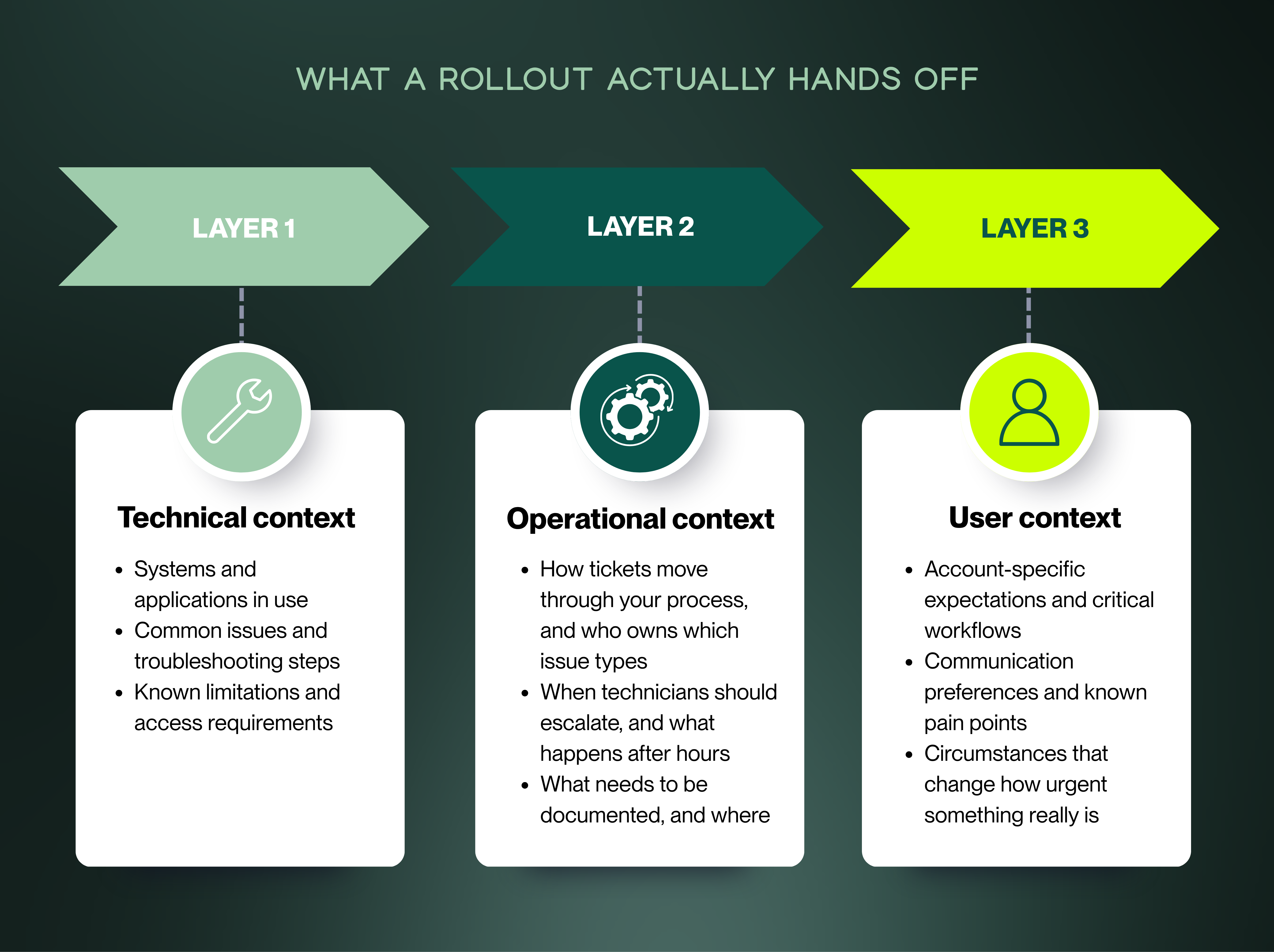
The goal isn't for a partner to memorize everything your internal team knows. It's giving them access to the context that changes how they handle the work.
Put Everyone Inside the Same Experience
One of the fastest ways to accidentally build two help desks is to have your internal team running on one set of tools while your partner runs on another. That's when tickets start moving between systems, notes get copied by hand, and users find themselves repeating information they already gave someone else.
The technology itself isn't really the point. Continuity is.
Whenever possible, both teams should be working from the same source of truth for tickets, documentation, user information, status, and history. Shared systems won't guarantee a seamless experience, but they make it far less likely that your organizational structure becomes your user's problem.
That becomes especially important the moment a ticket needs to escalate.
Define Escalation Before the First Escalation
The first real test of your rollout probably won't be a ticket the new team can solve. It'll be the one they can't.
That's when the seams show. Does the technician know exactly where the issue goes next? Does your internal team receive enough context to pick it up without retracing the same steps? Most importantly, does someone continue communicating with the user while all of that happens?
A good escalation shouldn't feel like a transfer from one company to another. It should feel like the same team bringing in the right person. Build that path before launch, including what the partner owns, when your internal team steps in, and who remains responsible for keeping the user informed.
Don't Launch Everything at Once
You don't have to hand the entire support operation to a new partner on day one, and if you're leading a lean technician team, you probably shouldn't. A pilot scoped to a specific group of users, a defined support window, or a limited set of ticket types gives both teams a chance to see what the process looks like under real conditions before it reaches everyone.
This is where the assumptions made during planning get tested. Documentation gaps surface. An escalation rule that looked clear on paper turns out to be ambiguous in practice. A user-specific expectation gets clarified before it becomes a complaint.
That's the value of a controlled start: you improve the model before it reaches a wider audience, instead of after.
7x more likely
Projects with excellent change management are roughly seven times more likely to meet or exceed their objectives than projects with poor change management: 88% of well-managed initiatives hit their goals, compared with just 13% of poorly managed ones.Source: Prosci
A white-label rollout is a change initiative whether or not anyone on your team calls it one. Access, integrations, and ticket routing usually get planned carefully because they're obvious launch requirements. The less visible part is how your team adapts, how the partner learns your account, and how the experience holds up once real users and real tickets enter the equation. A pilot gives you a chance to test both sides before expanding.
Measure Quality Before It Becomes a Pattern
Once the partner is live, ticket volume and response time will probably be the first numbers you watch. That's reasonable, but they can tell you that work is moving without telling you whether the experience is working.
A ticket can close within SLA and still require the user to repeat themselves. An escalation can happen quickly but arrive without enough context. A technician can resolve the issue and still leave the user wondering what happened.
That's why rollout quality needs more than one kind of signal:
Operational metrics: response time, resolution time, first-contact resolution, escalation volume, reopen rates
Quality signals: whether tickets are documented correctly, updates arrive when expected, escalations carry the context they need, and users are being asked to repeat themselves
Direct feedback: CSAT trends, comments and complaints, requests for a specific technician, and informal feedback from account owners
73%
of consumers say a consistent and reliable customer experience is very important to earning their trust. And 74% say the same about quickly responding to and resolving their concerns.
During a support rollout, you're responsible for both. Adding capacity only works if the experience stays consistent while the work keeps moving.
Source: PwC, Trust in US Business Survey
Support isn't an operational line item that shows up after the relationship exists. It's part of the relationship. Monitoring quality during a rollout isn't about catching the outside team doing something wrong. It's making sure the partnership is actually delivering the experience both organizations intended.
Build Feedback in Both Directions
Quality monitoring tells you where something may be going wrong. Feedback helps you understand why.
Your internal team may notice that certain escalations are arriving without enough context. The partner may discover that a troubleshooting document no longer matches the current environment. Either team may spot the same ticket showing up repeatedly and realize the problem isn't the individual resolution at all.
A partner close to the daily work will see patterns your internal team doesn't always have time to catch. That insight only becomes useful if there's a regular place for it to go. Build that exchange into the rollout rather than waiting until a recurring problem is big enough to demand everyone's attention.
Your Users Don't Need an Org Chart
One of the most common rollout mistakes is assuming users need to understand the structure behind their support. Usually, they don't.
They need to know where to go for help. They need someone to understand the problem, keep them informed, and own it through resolution. If those things remain consistent, the structure behind the experience matters far less than most teams assume.
A successful rollout isn't one where the partner is hidden so well nobody could ever tell. It's one where users notice the right things: better availability, more consistent support, less friction, and nothing else.
Last week we covered why the right partnership shouldn't cost you control once the partner is live. The same idea applies during rollout. You can change who is helping deliver support without asking your users to navigate the organizational change behind it.
ACTIONABLE TAKEAWAY
Test the Handoffs, Not Just the Setup
Before you expand the rollout, follow a few real tickets from beginning to end. Pay particular attention to the moments when responsibility changes hands.
Can the next technician pick up the issue without rebuilding the context? Does the user know who owns the next step? Does communication continue even when the ticket moves between teams?
Those moments will tell you more about whether the rollout is ready than a completed onboarding checklist will. If the handoffs feel seamless, the rest of the support experience is much more likely to feel seamless too.
More Support Shouldn't Mean More Confusion
Adding capacity shouldn't require your users to learn a new version of support.
Define the experience first. Give the new team the context they need to operate inside it. Test the handoffs before you expand, and pay attention to the parts of the experience that ticket volume and response times can't show you.
Do that, and bringing in outside support doesn't create a second experience for your users to navigate. It strengthens the one they already know.

About the Author

Michelle Burnham has worked in and around the technology industry for nearly a decade; collaborating with IT support teams and contributing to technical documentation, service-oriented content, and operational communications. With a background in editing, formatting, and visual design, she specializes in translating complex ideas into clear, engaging content. In addition to her freelance creative work, she serves as a contract graphic designer, copywriter, and video editor for Helpt.
7 min read | IT Managers & Directors | White-Label Help Desk
The fear isn't outside support. It's the moment your users first notice something's different.
You need more support capacity than your team currently has. Maybe launches spike your ticket queue past what your technicians can absorb. Maybe after-hours coverage keeps slipping through the cracks. Maybe your team is stretched between fixing what's broken today and building what your organization needs next.
You've found a white-label partner who can help.
Now comes the part that feels riskier than choosing the provider:
How do you actually bring them in?
Will your users notice another team is involved?
Will tickets bounce between people who don't share the same context?
And if the rollout goes sideways, will your internal team end up doing more work smoothing it over than they were doing before?
Those worries are reasonable. Adding capacity changes what's happening behind your support experience, even when the goal is to keep the experience itself exactly the same. That's why a good rollout doesn't start with an announcement.
It starts with a plan.
IN THIS ARTICLE
Why the rollout should start with the user experience, not the org chart
What has to stay consistent no matter who answers the ticket
How to transfer more than documentation to a new support team
Why shared systems and clear escalation paths prevent the visible seams
How a pilot and real quality metrics protect the launch
Design the Experience Before You Introduce the Partner
When teams plan a support expansion, it's natural to start with internal questions. Who gets system access? Which tickets does the partner handle? What hours do they cover? Those questions matter, but they aren't where to start.
Start with the experience your users already know. If they submit a ticket through the same channel today, that shouldn't change tomorrow simply because someone new is helping behind the scenes. The response should still sound like your team, arrive within the standards you've already set, and carry enough context that the user doesn't feel like they're starting over. Even when an issue escalates, the ownership should feel continuous.
That experience becomes your blueprint for the rollout. Your users shouldn't have to learn a new process just because you've added capacity behind the scenes. And the rollout doesn't need to be perfect on day one. It just needs to be intentional from day one.
Know What Should Change, and What Never Should
A good rollout can change plenty behind the scenes. You may gain after-hours coverage, give your internal technicians more room for strategic work, or add capacity during high-volume stretches. Users may even notice the upside through faster responses or coverage that didn't exist before.
What shouldn't change are the things that make support feel like your support. The same channels, communication standards, ownership expectations, and follow-through should still apply. Behind the scenes, the people handling the work may change. From the user's side of the ticket, it should still feel like one support operation.
We've written before about why white-label support is more than a logo: using your name and branded email is the visible part of the arrangement. Making sure users get the same context, communication, and follow-through no matter who's answering is the operational part. That's the part that decides whether the rollout actually feels seamless once it's live.
96% vs. 9%
Customers who go through a high-effort support interaction become disloyal 96% of the time. Customers with a low-effort interaction? Just 9%. Effort, not outcome, is what people remember about a support experience.
A rollout is, by definition, a moment where friction is more likely. There are new people, new handoffs, and a partner still learning the nuances of your account. Planning ahead doesn't eliminate that friction entirely. It keeps as much of it as possible behind the scenes instead of asking your users to absorb it.
Knowledge Transfer Is More Than a Folder of Docs
Once you know what the experience should look like, the challenge is helping a new support team actually deliver it. Documentation matters, but handing over technical instructions isn't the same as transferring what your team knows.
Your technicians have context that may never make it into a knowledge base. They know which applications can't afford downtime, where seemingly routine tickets tend to get complicated, and what can turn a normal request into an urgent one. That's the knowledge that shapes how a technician responds, not just what troubleshooting steps they follow.
A strong handoff accounts for three different layers of context:
The goal isn't for a partner to memorize everything your internal team knows. It's giving them access to the context that changes how they handle the work.
Put Everyone Inside the Same Experience
One of the fastest ways to accidentally build two help desks is to have your internal team running on one set of tools while your partner runs on another. That's when tickets start moving between systems, notes get copied by hand, and users find themselves repeating information they already gave someone else.
The technology itself isn't really the point. Continuity is.
Whenever possible, both teams should be working from the same source of truth for tickets, documentation, user information, status, and history. Shared systems won't guarantee a seamless experience, but they make it far less likely that your organizational structure becomes your user's problem.
That becomes especially important the moment a ticket needs to escalate.
Define Escalation Before the First Escalation
The first real test of your rollout probably won't be a ticket the new team can solve. It'll be the one they can't.
That's when the seams show. Does the technician know exactly where the issue goes next? Does your internal team receive enough context to pick it up without retracing the same steps? Most importantly, does someone continue communicating with the user while all of that happens?
A good escalation shouldn't feel like a transfer from one company to another. It should feel like the same team bringing in the right person. Build that path before launch, including what the partner owns, when your internal team steps in, and who remains responsible for keeping the user informed.
Don't Launch Everything at Once
You don't have to hand the entire support operation to a new partner on day one, and if you're leading a lean technician team, you probably shouldn't. A pilot scoped to a specific group of users, a defined support window, or a limited set of ticket types gives both teams a chance to see what the process looks like under real conditions before it reaches everyone.
This is where the assumptions made during planning get tested. Documentation gaps surface. An escalation rule that looked clear on paper turns out to be ambiguous in practice. A user-specific expectation gets clarified before it becomes a complaint.
That's the value of a controlled start: you improve the model before it reaches a wider audience, instead of after.
7x more likely
Projects with excellent change management are roughly seven times more likely to meet or exceed their objectives than projects with poor change management: 88% of well-managed initiatives hit their goals, compared with just 13% of poorly managed ones.Source: Prosci
A white-label rollout is a change initiative whether or not anyone on your team calls it one. Access, integrations, and ticket routing usually get planned carefully because they're obvious launch requirements. The less visible part is how your team adapts, how the partner learns your account, and how the experience holds up once real users and real tickets enter the equation. A pilot gives you a chance to test both sides before expanding.
Measure Quality Before It Becomes a Pattern
Once the partner is live, ticket volume and response time will probably be the first numbers you watch. That's reasonable, but they can tell you that work is moving without telling you whether the experience is working.
A ticket can close within SLA and still require the user to repeat themselves. An escalation can happen quickly but arrive without enough context. A technician can resolve the issue and still leave the user wondering what happened.
That's why rollout quality needs more than one kind of signal:
Operational metrics: response time, resolution time, first-contact resolution, escalation volume, reopen rates
Quality signals: whether tickets are documented correctly, updates arrive when expected, escalations carry the context they need, and users are being asked to repeat themselves
Direct feedback: CSAT trends, comments and complaints, requests for a specific technician, and informal feedback from account owners
73%
of consumers say a consistent and reliable customer experience is very important to earning their trust. And 74% say the same about quickly responding to and resolving their concerns.
During a support rollout, you're responsible for both. Adding capacity only works if the experience stays consistent while the work keeps moving.
Source: PwC, Trust in US Business Survey
Support isn't an operational line item that shows up after the relationship exists. It's part of the relationship. Monitoring quality during a rollout isn't about catching the outside team doing something wrong. It's making sure the partnership is actually delivering the experience both organizations intended.
Build Feedback in Both Directions
Quality monitoring tells you where something may be going wrong. Feedback helps you understand why.
Your internal team may notice that certain escalations are arriving without enough context. The partner may discover that a troubleshooting document no longer matches the current environment. Either team may spot the same ticket showing up repeatedly and realize the problem isn't the individual resolution at all.
A partner close to the daily work will see patterns your internal team doesn't always have time to catch. That insight only becomes useful if there's a regular place for it to go. Build that exchange into the rollout rather than waiting until a recurring problem is big enough to demand everyone's attention.
Your Users Don't Need an Org Chart
One of the most common rollout mistakes is assuming users need to understand the structure behind their support. Usually, they don't.
They need to know where to go for help. They need someone to understand the problem, keep them informed, and own it through resolution. If those things remain consistent, the structure behind the experience matters far less than most teams assume.
A successful rollout isn't one where the partner is hidden so well nobody could ever tell. It's one where users notice the right things: better availability, more consistent support, less friction, and nothing else.
Last week we covered why the right partnership shouldn't cost you control once the partner is live. The same idea applies during rollout. You can change who is helping deliver support without asking your users to navigate the organizational change behind it.
ACTIONABLE TAKEAWAY
Test the Handoffs, Not Just the Setup
Before you expand the rollout, follow a few real tickets from beginning to end. Pay particular attention to the moments when responsibility changes hands.
Can the next technician pick up the issue without rebuilding the context? Does the user know who owns the next step? Does communication continue even when the ticket moves between teams?
Those moments will tell you more about whether the rollout is ready than a completed onboarding checklist will. If the handoffs feel seamless, the rest of the support experience is much more likely to feel seamless too.
More Support Shouldn't Mean More Confusion
Adding capacity shouldn't require your users to learn a new version of support.
Define the experience first. Give the new team the context they need to operate inside it. Test the handoffs before you expand, and pay attention to the parts of the experience that ticket volume and response times can't show you.
Do that, and bringing in outside support doesn't create a second experience for your users to navigate. It strengthens the one they already know.
About the Author
Michelle Burnham has worked in and around the technology industry for nearly a decade; collaborating with IT support teams and contributing to technical documentation, service-oriented content, and operational communications. With a background in editing, formatting, and visual design, she specializes in translating complex ideas into clear, engaging content. In addition to her freelance creative work, she serves as a contract graphic designer, copywriter, and video editor for Helpt.
Stop Answering Calls.
Start Driving Growth.
Let Helpt's US-based technicians handle your support calls 24x7 while your team focuses on what matters most.
Stop Answering Calls.
Start Driving Growth.
Let Helpt's US-based technicians handle your support calls 24x7 while your team focuses on what matters most.
Stop Answering Calls.
Start Driving Growth.
Let Helpt's US-based technicians handle your support calls 24x7 while your team focuses on what matters most.
©2026 Helpt, a part of PAG Technology Inc. All Rights Reserved.