Stop Starting Every Incident From Zero
How small IT teams can reduce incident response delays by building operational visibility before outages occur.
IN THIS ARTICLE |
|
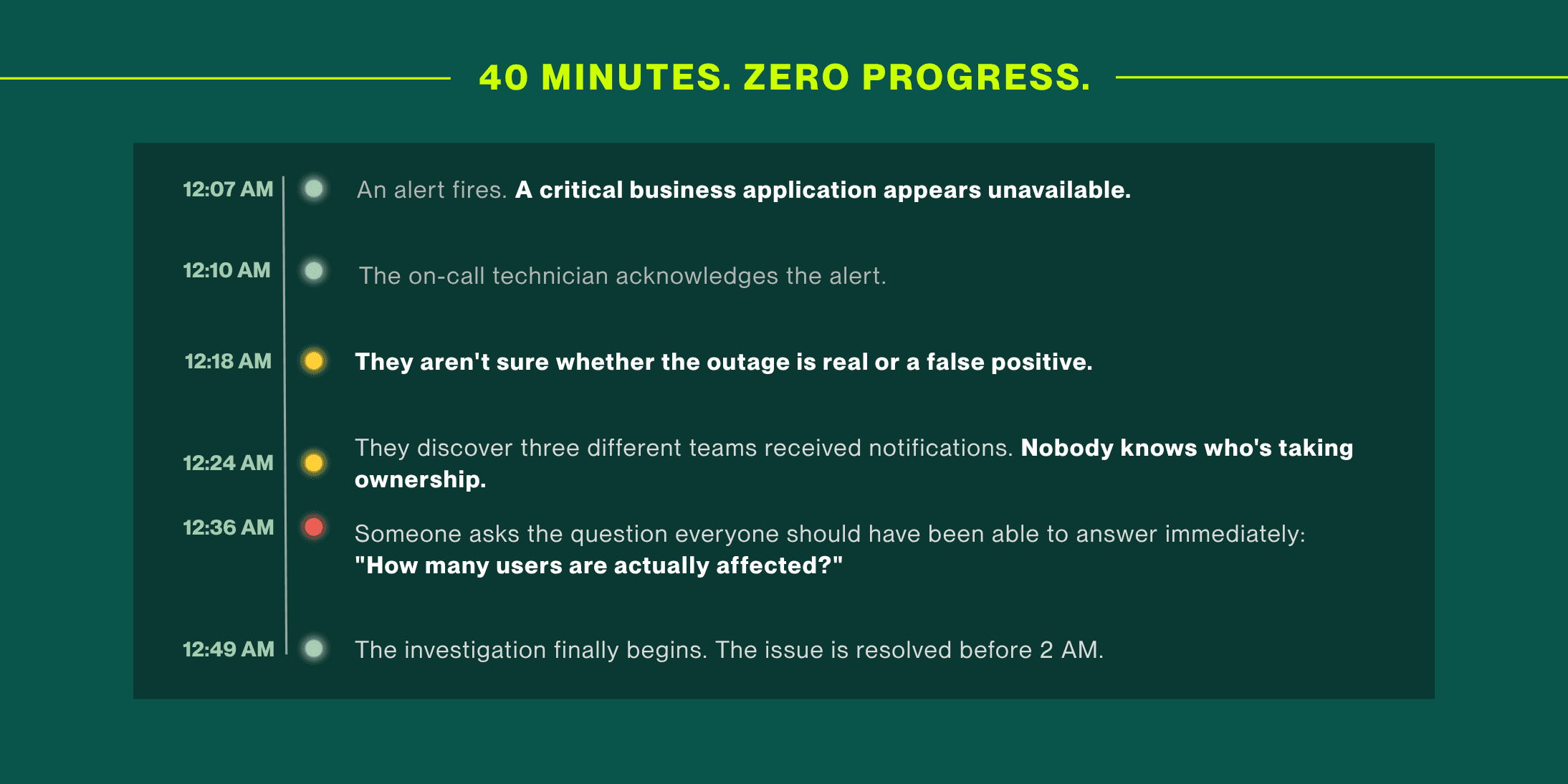
For many small IT teams, that's the real bottleneck. Not response. Not resolution.
It's the fact that every incident starts from zero.
Before anyone can troubleshoot, they're figuring out ownership, business impact, dependencies, and urgency. The clock starts running long before the investigation begins.
The good news is that most visibility gaps aren't technology problems. They're documentation and process problems, which means you can start fixing them immediately.
What Those First 30 Minutes Actually Cost
Most teams don't realize how much time they're losing because those first 20–30 minutes feel like work. People are responding to alerts, sending messages, and gathering information.
But none of that moves the incident closer to resolution.
It's the cost of starting from zero.
The Uptime Institute's 2025 Annual Outage Analysis found that more than half of respondents said their most recent significant outage cost over $100,000; with one in five crossing the $1 million mark. Those numbers are skewed toward enterprise environments. For a small IT team, the math looks different: lower per-incident dollar figures, but higher exposure per person and far less margin for slow starts.
The second number stings differently. A 2026 State of Incident Management report found that 73% of organizations experienced outages directly linked to ignored alerts. Not missed alerts, ignored ones. That happens when teams are buried under noise with no way to separate signal from distraction. Research shows IT teams receive over 2,000 alerts weekly, with only 3% requiring immediate action. When your on-call tech has been conditioned by 1,940 irrelevant pings, the one real alert doesn't feel different from the rest.
The visibility problem isn't that teams are slow. It's that they're starting every incident from zero context.
If every incident starts from zero, the solution is simple: stop forcing your team to rebuild critical context during an outage.
That's where a Business Impact Map comes in.
FIX #1
Build a Business Impact Map
Most organizations have technical documentation: network diagrams, system architecture maps, configuration wikis. What almost none of them have is a Business Impact Map. The distinction matters more than you'd think.
A technical diagram shows how systems connect. A business impact map shows why they matter, and to whom, and how urgently.
When an incident fires at midnight, your on-call tech doesn't need a network diagram. They need to know: Is this system critical enough to wake someone up? Who do I call? How many people are affected right now? Without a business impact map, they spend 20–30 minutes reconstructing that context on the fly. With one, it's a 2-minute check.
Here's how to build one. For each of your critical systems, create a simple record that captures:
Be specific. Not "server cluster A.” Write "the invoicing system that Finance runs end-of-month reporting on" or "the customer portal that handles order tracking for 2,000 active users." |
List the departments affected and note their time sensitivity. Finance needs the invoicing system live by 6 AM on billing days. HR needs the onboarding portal during business hours only. That context changes everything about how you triage at 3 AM. |
One name and a phone number. Then a second name and a phone number for when the first person doesn't answer. No ambiguity. No group chat escalations. |
"Every hour of downtime delays next-day shipping for approximately 300 orders" or "This outage blocks 40 remote employees from accessing any company resources." When your on-call tech can articulate impact in business terms, they can escalate with confidence and make smart triage decisions without waiting for a manager to weigh in. |
If this system going down almost always means a related system is also affected, document that. If there's a common false-positive pattern in your monitoring for this system, note it. Institutional knowledge that lives in one person's head is a liability. Written down, it's an asset. |
You don't need to map every system at once. Start with your top five to eight most critical systems; the ones where a 2 AM outage would have you calling your IT director. Get those documented this week. Expand from there. Store it somewhere your on-call team can access from their phone at midnight. A shared doc, a wiki, your ticketing system; format matters less than accessibility.
FIX #2
Create a Single Source of Operational Truth
The business impact map tells your team what they're dealing with. The single source of operational truth tells them what's happening right now, and keeps everyone on the same page without a flurry of Slack messages and status pings.
For small IT teams, this doesn't require a new platform. It requires a decision: one place, always. Here's the framework:
📍 One authoritative location for incident status Pick your tool: a ticketing system, a shared dashboard, a status page, etc. and make it the home for active incident information: what's happening, who owns it, what's been tried, and current status. Not Slack. Not email threads. Those are communication channels, not sources of truth. |
🎯 Alert tiers defined before an incident, not during one Not every alert is a five-alarm fire, but without pre-defined tiers, every alert feels like one. Define what P1, P2, and P3 mean for your environment. P1 might be: "customer-facing system down, more than 50 users affected, outside business hours." When those definitions exist in writing, your on-call tech can make the right call at 2 AM without second-guessing themselves. |
📋 A 5-step runbook for your most common incident types Not a comprehensive manual. Five steps. What to check first, what to rule out, when to escalate, who to call. For your three or four most recurring incident types, this document alone can cut early-stage confusion time in half. |
📞 Explicit escalation paths Who gets called, in what order, under what conditions. This sounds too basic to mention, but 45% of organizations still don't have a documented incident response plan. If your team is in that group, an escalation path document is the highest-ROI thing you can create this week. |
🔁 After-action reviews that close the visibility loop When an incident closes, add one section to your post-incident report: Where did visibility break down? Did it take too long to identify scope? Was ownership unclear? Was the business impact unknown? Every incident your team runs is a chance to tighten the system so the next one goes faster. |
Start Here: A One-Hour Visibility Audit
If you only have an hour this week, spend it here.
20 MIN Map your five most critical systems
For each one, answer two questions in writing: What business process does it support? Who is the primary human owner?
20 MIN Review your last three incidents
How long did it take before the investigation actually started? What information were you missing at the beginning? Write those gaps down.
20 MIN Pick one thing to fix first
One runbook. One escalation path document. One business impact record for your most critical system. Not all of it; one thing, done well, this week.
Visibility doesn't get built in a day. But it gets built one documented decision at a time. The teams that consistently respond fast to incidents aren't the ones with the best tools, they're the ones that did the quiet work of building structure before the incident happened.
When Your Coverage Needs Backup
Even with strong visibility infrastructure, small IT teams face a ceiling after hours. Two technicians on a rotating on-call schedule can have the best runbooks in the world and still hit a 3 AM incident that's bigger than one person can handle alone.
Helpt works as an extension of IT teams exactly like yours: all-human, all-US-based, available around the clock. We operate from your system with your business context. So the handoff is seamless and your users experience the same quality of support at midnight that they get at noon. Explore our coverage options.
RELATED READING: 24/7 IT Support Without Burning Out Your Team
The Bottom Line
If every major incident feels like your team is figuring things out from scratch, that's usually because they are.
The problem isn't effort. It's missing context. Your team is spending the first 20–30 minutes of every incident building context that should have already existed.
The fix isn't glamorous. It's a business impact map in a shared doc. It's a written escalation path. It's five-step runbooks for your most common failure modes. It's one tool that everyone trusts as the source of truth.
Build the structure before the incident. Your on-call team (and your 3 AM self) will thank you.
About the Author

Michelle Burnham has worked in and around the technology industry for nearly a decade; collaborating with IT support teams and contributing to technical documentation, service-oriented content, and operational communications. With a background in editing, formatting, and visual design, she specializes in translating complex ideas into clear, engaging content. In addition to her freelance creative work, she serves as a contract graphic designer, copywriter, and video editor for Helpt.
How small IT teams can reduce incident response delays by building operational visibility before outages occur.
IN THIS ARTICLE |
|
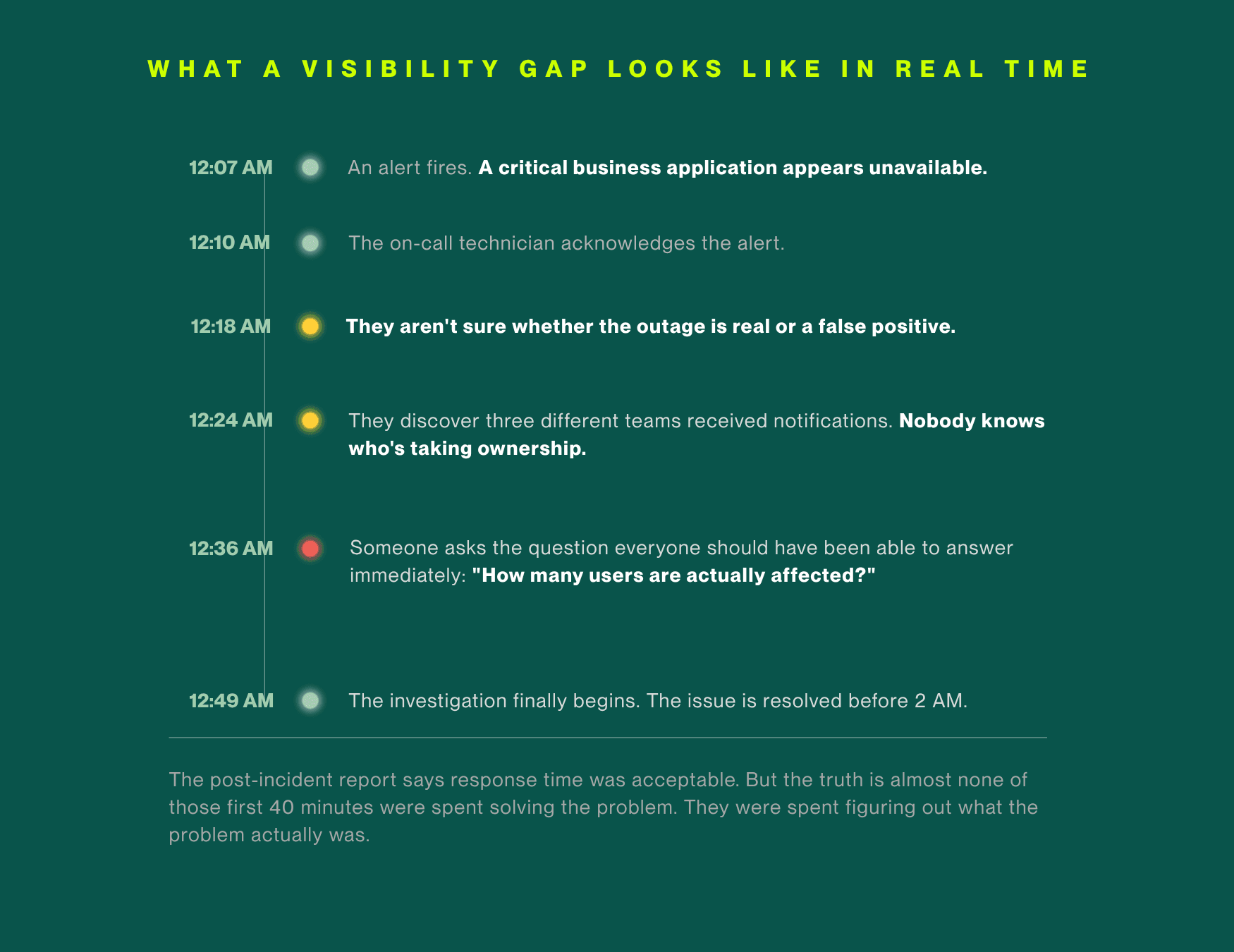
For many small IT teams, that's the real bottleneck. Not response. Not resolution.
It's the fact that every incident starts from zero.
Before anyone can troubleshoot, they're figuring out ownership, business impact, dependencies, and urgency. The clock starts running long before the investigation begins.
The good news is that most visibility gaps aren't technology problems. They're documentation and process problems, which means you can start fixing them immediately.
What Those First 30 Minutes Actually Cost
Most teams don't realize how much time they're losing because those first 20–30 minutes feel like work. People are responding to alerts, sending messages, and gathering information.
But none of that moves the incident closer to resolution.
It's the cost of starting from zero.
The Uptime Institute's 2025 Annual Outage Analysis found that more than half of respondents said their most recent significant outage cost over $100,000; with one in five crossing the $1 million mark. Those numbers are skewed toward enterprise environments. For a small IT team, the math looks different: lower per-incident dollar figures, but higher exposure per person and far less margin for slow starts.
The second number stings differently. A 2026 State of Incident Management report found that 73% of organizations experienced outages directly linked to ignored alerts. Not missed alerts, ignored ones. That happens when teams are buried under noise with no way to separate signal from distraction. Research shows IT teams receive over 2,000 alerts weekly, with only 3% requiring immediate action. When your on-call tech has been conditioned by 1,940 irrelevant pings, the one real alert doesn't feel different from the rest.
The visibility problem isn't that teams are slow. It's that they're starting every incident from zero context.
If every incident starts from zero, the solution is simple: stop forcing your team to rebuild critical context during an outage.
That's where a Business Impact Map comes in.
FIX #1
Build a Business Impact Map
Most organizations have technical documentation: network diagrams, system architecture maps, configuration wikis. What almost none of them have is a Business Impact Map. The distinction matters more than you'd think.
A technical diagram shows how systems connect. A business impact map shows why they matter, and to whom, and how urgently.
When an incident fires at midnight, your on-call tech doesn't need a network diagram. They need to know: Is this system critical enough to wake someone up? Who do I call? How many people are affected right now? Without a business impact map, they spend 20–30 minutes reconstructing that context on the fly. With one, it's a 2-minute check.
Here's how to build one. For each of your critical systems, create a simple record that captures:
Be specific. Not "server cluster A.” Write "the invoicing system that Finance runs end-of-month reporting on" or "the customer portal that handles order tracking for 2,000 active users." |
List the departments affected and note their time sensitivity. Finance needs the invoicing system live by 6 AM on billing days. HR needs the onboarding portal during business hours only. That context changes everything about how you triage at 3 AM. |
One name and a phone number. Then a second name and a phone number for when the first person doesn't answer. No ambiguity. No group chat escalations. |
"Every hour of downtime delays next-day shipping for approximately 300 orders" or "This outage blocks 40 remote employees from accessing any company resources." When your on-call tech can articulate impact in business terms, they can escalate with confidence and make smart triage decisions without waiting for a manager to weigh in. |
If this system going down almost always means a related system is also affected, document that. If there's a common false-positive pattern in your monitoring for this system, note it. Institutional knowledge that lives in one person's head is a liability. Written down, it's an asset. |
You don't need to map every system at once. Start with your top five to eight most critical systems; the ones where a 2 AM outage would have you calling your IT director. Get those documented this week. Expand from there. Store it somewhere your on-call team can access from their phone at midnight. A shared doc, a wiki, your ticketing system; format matters less than accessibility.
FIX #2
Create a Single Source of Operational Truth
The business impact map tells your team what they're dealing with. The single source of operational truth tells them what's happening right now, and keeps everyone on the same page without a flurry of Slack messages and status pings.
For small IT teams, this doesn't require a new platform. It requires a decision: one place, always. Here's the framework:
📍 One authoritative location for incident status Pick your tool: a ticketing system, a shared dashboard, a status page, etc. and make it the home for active incident information: what's happening, who owns it, what's been tried, and current status. Not Slack. Not email threads. Those are communication channels, not sources of truth. |
🎯 Alert tiers defined before an incident, not during one Not every alert is a five-alarm fire, but without pre-defined tiers, every alert feels like one. Define what P1, P2, and P3 mean for your environment. P1 might be: "customer-facing system down, more than 50 users affected, outside business hours." When those definitions exist in writing, your on-call tech can make the right call at 2 AM without second-guessing themselves. |
📋 A 5-step runbook for your most common incident types Not a comprehensive manual. Five steps. What to check first, what to rule out, when to escalate, who to call. For your three or four most recurring incident types, this document alone can cut early-stage confusion time in half. |
📞 Explicit escalation paths Who gets called, in what order, under what conditions. This sounds too basic to mention, but 45% of organizations still don't have a documented incident response plan. If your team is in that group, an escalation path document is the highest-ROI thing you can create this week. |
🔁 After-action reviews that close the visibility loop When an incident closes, add one section to your post-incident report: Where did visibility break down? Did it take too long to identify scope? Was ownership unclear? Was the business impact unknown? Every incident your team runs is a chance to tighten the system so the next one goes faster. |
Start Here: A One-Hour Visibility Audit
If you only have an hour this week, spend it here.
20 MIN Map your five most critical systems
For each one, answer two questions in writing: What business process does it support? Who is the primary human owner?
20 MIN Review your last three incidents
How long did it take before the investigation actually started? What information were you missing at the beginning? Write those gaps down.
20 MIN Pick one thing to fix first
One runbook. One escalation path document. One business impact record for your most critical system. Not all of it; one thing, done well, this week.
Visibility doesn't get built in a day. But it gets built one documented decision at a time. The teams that consistently respond fast to incidents aren't the ones with the best tools, they're the ones that did the quiet work of building structure before the incident happened.
When Your Coverage Needs Backup
Even with strong visibility infrastructure, small IT teams face a ceiling after hours. Two technicians on a rotating on-call schedule can have the best runbooks in the world and still hit a 3 AM incident that's bigger than one person can handle alone.
Helpt works as an extension of IT teams exactly like yours: all-human, all-US-based, available around the clock. We operate from your system with your business context. So the handoff is seamless and your users experience the same quality of support at midnight that they get at noon. Explore our coverage options.
RELATED READING: 24/7 IT Support Without Burning Out Your Team
The Bottom Line
If every major incident feels like your team is figuring things out from scratch, that's usually because they are.
The problem isn't effort. It's missing context. Your team is spending the first 20–30 minutes of every incident building context that should have already existed.
The fix isn't glamorous. It's a business impact map in a shared doc. It's a written escalation path. It's five-step runbooks for your most common failure modes. It's one tool that everyone trusts as the source of truth.
Build the structure before the incident. Your on-call team (and your 3 AM self) will thank you.
About the Author
Michelle Burnham has worked in and around the technology industry for nearly a decade; collaborating with IT support teams and contributing to technical documentation, service-oriented content, and operational communications. With a background in editing, formatting, and visual design, she specializes in translating complex ideas into clear, engaging content. In addition to her freelance creative work, she serves as a contract graphic designer, copywriter, and video editor for Helpt.
Stop Answering Calls.
Start Driving Growth.
Let Helpt's US-based technicians handle your support calls 24x7 while your team focuses on what matters most.
Stop Answering Calls.
Start Driving Growth.
Let Helpt's US-based technicians handle your support calls 24x7 while your team focuses on what matters most.
Stop Answering Calls.
Start Driving Growth.
Let Helpt's US-based technicians handle your support calls 24x7 while your team focuses on what matters most.
©2026 Helpt, a part of PAG Technology Inc. All Rights Reserved.