The IT Night Shift You Already Have

Your team is already closer to 24/7 coverage than you think.
Most small IT teams don't need more headcount. They need better handoffs, clearer ownership, and a system that keeps work moving when the primary team is offline.
IN THIS ARTICLE
Why most small IT teams don't need true 24/7 staffing
How a Coverage Matrix reveals hidden coverage gaps and strengths
The role of handoffs, runbooks, and documentation in extending support
How remote workforce support can improve coverage without increasing hours
A practical one-hour audit to identify coverage risks and next steps
Stop Solving The Wrong Problem
Every IT manager has had this conversation. A department head asks why support isn't available in the evening. An executive floats the idea of round-the-clock coverage. A remote employee in another time zone wonders why they have to wait until morning.
The discussion almost always lands in the same place: we need more people.
That's usually the wrong starting point, and the most expensive one.
Coverage isn't just a headcount problem. It's a combination of people, process, documentation, and technology. The teams that crack extended coverage without burning out their staff figured that out early. Here's the framework.
"Very few incidents require someone actively working every hour of every day. What they require is awareness, a clear escalation path, and established ownership."
The Demand Doesn't Justify Constant Staffing
Before you add a night shift, look at your actual ticket patterns. Most small teams will find the math doesn't justify round-the-clock staffing, but it does justify better systems during the hours they're already online.
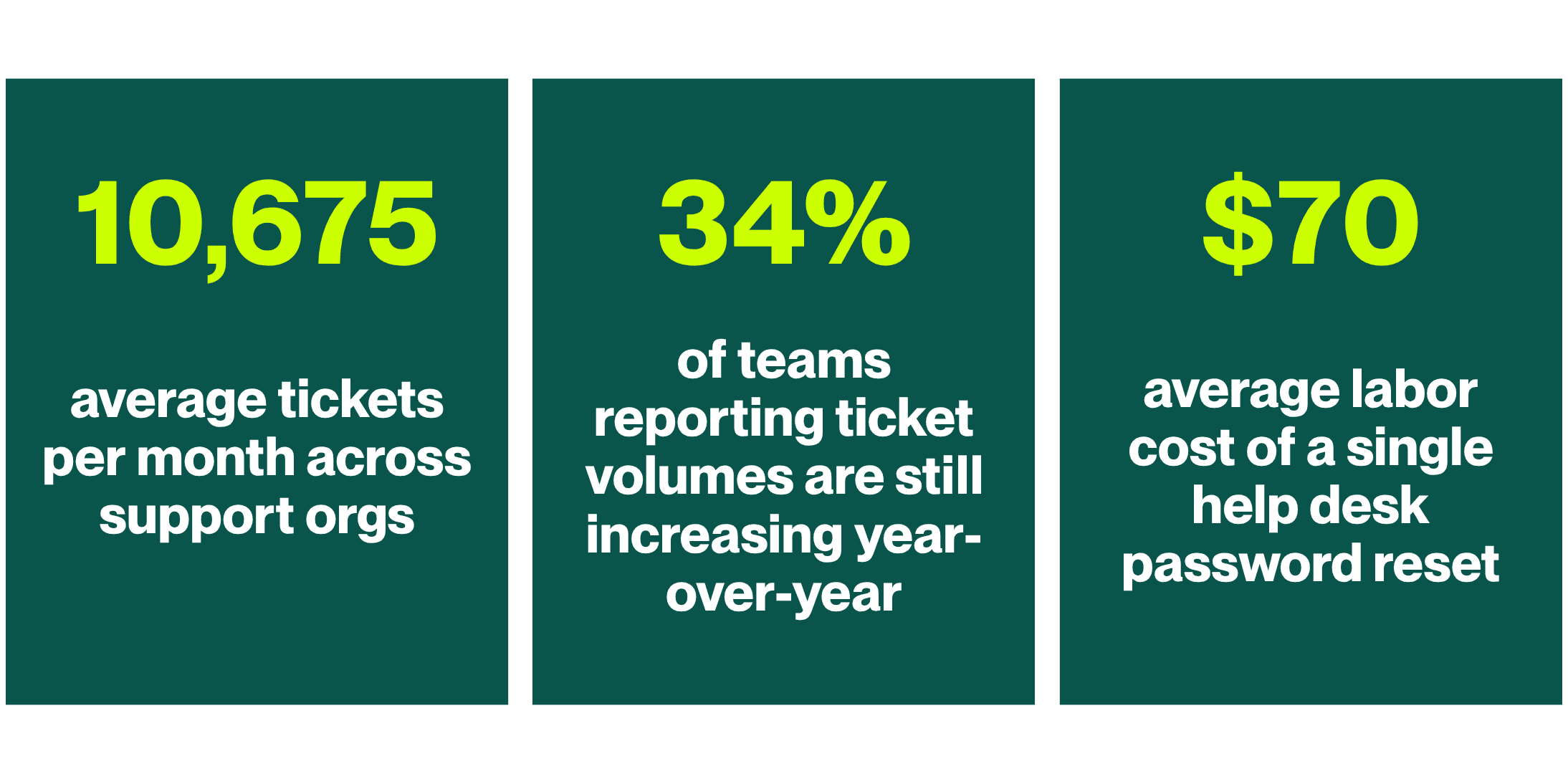
The teams that look understaffed are often just under documented. Every runbook you write, every escalation path you formalize, and every self-service article you publish is coverage you didn't have to hire for. That last stat alone: $70 per password reset, per Forrester Research, makes the case for self-service portals faster than any budget conversation will.
Source: HDI State of Tech Support 2025
The Coverage Matrix: Build It In An Afternoon
A Coverage Matrix is a named methodology, not just a table. It maps every critical system against four things: what it is, how fast it needs a response, who owns it, and who picks it up when that person is unavailable.
The value isn't in the exercise. It's in what surfaces when you do it: single points of failure you didn't know you had, systems that don't need a fast response (and therefore don't need an on-call escalation), and backup coverage nodes you already have but never formalized.
SYSTEM | RESPONSE TARGET | PRIMARY OWNER | ESCALATION BACKUP |
Customer Portal | 15 min | Technician A | Vendor SLA |
VPN | 30 min | Technician B | Technician C |
Microsoft 365 | 30 min | Technician B | MSP Partner |
ERP Platform | 2 hrs | Ops Manager | Vendor support |
Internal wiki | Next day | Any tech | — |
Printer Services | Next day | Any tech | — |
Start with your five to eight most critical systems — the ones where a 2 AM outage would have you calling your IT director. Get those documented first. Store it somewhere your on-call team can reach from their phone. Format matters far less than accessibility.
The Handoff Is Where Coverage Lives Or Dies
The biggest enemy of extended coverage isn't a lack of staffing. It's lost context.
When one technician closes their laptop and another picks up an issue hours later, everything that happened in between is usually trapped in Slack DMs, browser tabs, and short-term memory. The incoming tech isn't picking up where things left off. They're starting over.
A structured handoff eliminates that. Every active incident should answer these six things before someone logs off:
📋Shift handoff template — copy this
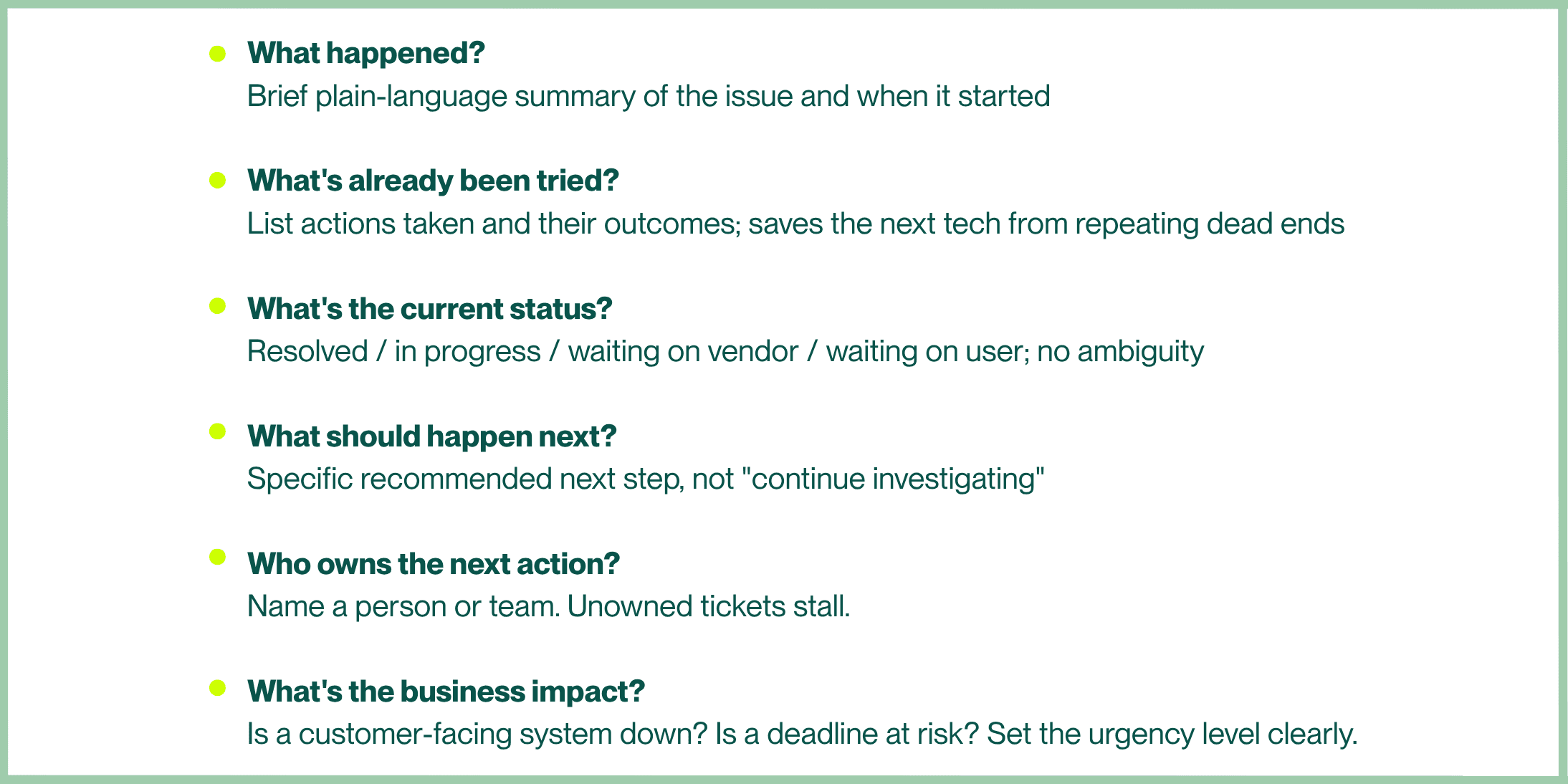
This doesn't require a new tool. Drop it into your ticket system, a shared doc, or a dedicated Slack channel. For a deeper look at why rebuilding context mid-incident is so costly (and how to prevent it upstream) this piece connects directly:
RELATED READING: Stop Starting Every Incident From Zero
Runbooks Are Coverage You Never Have To Hire
When troubleshooting knowledge lives only in one person's head, your coverage ends when they go offline.
Runbooks convert that individual knowledge into organizational knowledge; available to any technician, any time, regardless of who's on shift. IBM's ITSM guidance frames standardization as one of the foundational tenets of modern service delivery for exactly this reason: it removes the ad hoc nature of support and makes outcomes repeatable.
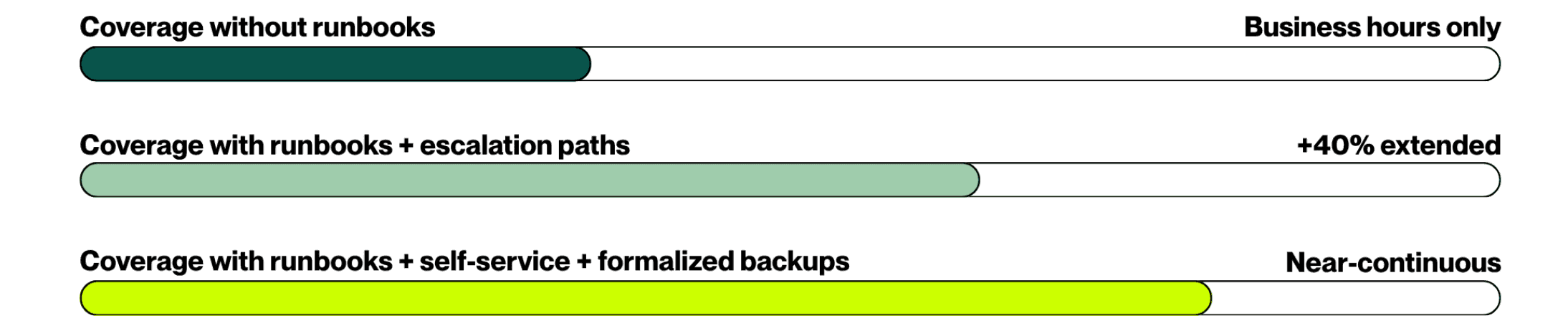
You don't need a comprehensive manual. Five steps per incident type is enough, what to check first, what to rule out, when to escalate, who to call. For your three or four most recurring failure modes, that document alone can cut early-stage confusion time in half. For complex environments, a five-minute screen recording often communicates more context than several pages of written notes.
Three Questions That Reveal Where To Focus
Once your Coverage Matrix exists, run it through these filters. The answers tell you where to invest time before you even consider additional headcount.
⚠️ Where are your single points of failure?
If one technician is the only person who can support a critical system, that's a coverage risk. Cross-training is usually faster and cheaper than hiring.
🕔 Which systems truly need immediate response?
Not everything deserves a midnight call. Separating urgent from important reduces burnout and sharpens the escalations that actually matter.
📄 Which recurring incidents have no runbook?
If your team has to improvise the same fix more than once, that's a documentation gap disguised as a staffing problem. Pick your top three repeat incidents and write five steps each. That's your coverage floor.
Separating urgent systems from important ones is also the first move toward getting out of reactive mode entirely — and staying out of it. This piece breaks down why small IT teams keep getting pulled back into firefighting, and how to build the structure that breaks the cycle:
RELATED READING: The Path to Proactive Maturity: Why Small IT Teams Stay Reactive and How to Break the Cycle
Your Distributed Team Is Already Covering More Than You Realize
Remote work gets framed as a support challenge. It can be. But it also creates coverage opportunities most teams haven't mapped.
A technician in Texas and another in California are only two time zones apart, but that difference can extend your effective support window by several hours without anyone working a longer shift. Most IT managers have never actually calculated their effective support window based on where their team members are located. That number is worth knowing before you hire.
Microsoft's Work Trend Index found that after-hours activity across Microsoft 365 has been rising steadily, with meetings after 8 PM up 16% year-over-year. Your users are working a wider window than your current support structure assumes.
A few moves worth making now: survey your team's natural schedule preferences (some people start early, some run late — let those preferences do double duty), inventory your vendor SLAs to understand what's already covered after hours, and document which application owners and technical leads across the business could field a first call on systems they own. You likely already have more coverage nodes than appear on your official org chart.
"Organizations often discover they already have coverage assets spread across multiple time zones. They simply haven't mapped them."
Extended coverage doesn't have to mean extended hours. Here's how other small IT teams have approached it without burning anyone out:
RELATED READING: 24/7 IT Support Without Burning Out Your Team
If You Only Have An Hour This Week
Don't try to build the whole system at once. Pick one thing, do it well, and expand from there. Here's the highest-ROI sequence:
ONE-HOUR COVERAGE AUDIT
Do this before your next on-call rotation
20 MIN — Map your five most critical systems
For each one, write down two things: the business process it supports (be specific, not "server cluster A," but what it actually enables) and the name of its primary human owner.
20 MIN — Find your single points of failure
Look at your Coverage Matrix and flag every system where only one person can respond. That's your cross-training list. For at least one of those systems, document a backup owner this week — even informally.
20 MIN — Pick one thing to fix first
One runbook for your most common after-hours incident type. One handoff template dropped into your ticketing system. One escalation path written down for your most critical system. Not all of it — one thing, done well, this week.
Coverage doesn't get built in a day. It gets built one documented decision at a time. The teams that handle after-hours incidents without stress aren't necessarily bigger or better resourced — they did the quiet work of building structure before the incident happened.
About the Author

Michelle Burnham has worked in and around the technology industry for nearly a decade; collaborating with IT support teams and contributing to technical documentation, service-oriented content, and operational communications. With a background in editing, formatting, and visual design, she specializes in translating complex ideas into clear, engaging content. In addition to her freelance creative work, she serves as a contract graphic designer, copywriter, and video editor for Helpt.
Your team is already closer to 24/7 coverage than you think.
Most small IT teams don't need more headcount. They need better handoffs, clearer ownership, and a system that keeps work moving when the primary team is offline.
IN THIS ARTICLE
Why most small IT teams don't need true 24/7 staffing
How a Coverage Matrix reveals hidden coverage gaps and strengths
The role of handoffs, runbooks, and documentation in extending support
How remote workforce support can improve coverage without increasing hours
A practical one-hour audit to identify coverage risks and next steps
Stop Solving The Wrong Problem
Every IT manager has had this conversation. A department head asks why support isn't available in the evening. An executive floats the idea of round-the-clock coverage. A remote employee in another time zone wonders why they have to wait until morning.
The discussion almost always lands in the same place: we need more people.
That's usually the wrong starting point, and the most expensive one.
Coverage isn't just a headcount problem. It's a combination of people, process, documentation, and technology. The teams that crack extended coverage without burning out their staff figured that out early. Here's the framework.
"Very few incidents require someone actively working every hour of every day. What they require is awareness, a clear escalation path, and established ownership."
The Demand Doesn't Justify Constant Staffing
Before you add a night shift, look at your actual ticket patterns. Most small teams will find the math doesn't justify round-the-clock staffing, but it does justify better systems during the hours they're already online.
The teams that look understaffed are often just under documented. Every runbook you write, every escalation path you formalize, and every self-service article you publish is coverage you didn't have to hire for. That last stat alone: $70 per password reset, per Forrester Research, makes the case for self-service portals faster than any budget conversation will.
Source: HDI State of Tech Support 2025
The Coverage Matrix: Build It In An Afternoon
A Coverage Matrix is a named methodology, not just a table. It maps every critical system against four things: what it is, how fast it needs a response, who owns it, and who picks it up when that person is unavailable.
The value isn't in the exercise. It's in what surfaces when you do it: single points of failure you didn't know you had, systems that don't need a fast response (and therefore don't need an on-call escalation), and backup coverage nodes you already have but never formalized.
SYSTEM | RESPONSE TARGET | PRIMARY OWNER | ESCALATION BACKUP |
Customer Portal | 15 min | Technician A | Vendor SLA |
VPN | 30 min | Technician B | Technician C |
Microsoft 365 | 30 min | Technician B | MSP Partner |
ERP Platform | 2 hrs | Ops Manager | Vendor support |
Internal wiki | Next day | Any tech | — |
Printer Services | Next day | Any tech | — |
Start with your five to eight most critical systems — the ones where a 2 AM outage would have you calling your IT director. Get those documented first. Store it somewhere your on-call team can reach from their phone. Format matters far less than accessibility.
The Handoff Is Where Coverage Lives Or Dies
The biggest enemy of extended coverage isn't a lack of staffing. It's lost context.
When one technician closes their laptop and another picks up an issue hours later, everything that happened in between is usually trapped in Slack DMs, browser tabs, and short-term memory. The incoming tech isn't picking up where things left off. They're starting over.
A structured handoff eliminates that. Every active incident should answer these six things before someone logs off:
📋Shift handoff template — copy this
This doesn't require a new tool. Drop it into your ticket system, a shared doc, or a dedicated Slack channel. For a deeper look at why rebuilding context mid-incident is so costly (and how to prevent it upstream) this piece connects directly:
RELATED READING: Stop Starting Every Incident From Zero
Runbooks Are Coverage You Never Have To Hire
When troubleshooting knowledge lives only in one person's head, your coverage ends when they go offline.
Runbooks convert that individual knowledge into organizational knowledge; available to any technician, any time, regardless of who's on shift. IBM's ITSM guidance frames standardization as one of the foundational tenets of modern service delivery for exactly this reason: it removes the ad hoc nature of support and makes outcomes repeatable.
You don't need a comprehensive manual. Five steps per incident type is enough, what to check first, what to rule out, when to escalate, who to call. For your three or four most recurring failure modes, that document alone can cut early-stage confusion time in half. For complex environments, a five-minute screen recording often communicates more context than several pages of written notes.
Three Questions That Reveal Where To Focus
Once your Coverage Matrix exists, run it through these filters. The answers tell you where to invest time before you even consider additional headcount.
⚠️ Where are your single points of failure?
If one technician is the only person who can support a critical system, that's a coverage risk. Cross-training is usually faster and cheaper than hiring.
🕔 Which systems truly need immediate response?
Not everything deserves a midnight call. Separating urgent from important reduces burnout and sharpens the escalations that actually matter.
📄 Which recurring incidents have no runbook?
If your team has to improvise the same fix more than once, that's a documentation gap disguised as a staffing problem. Pick your top three repeat incidents and write five steps each. That's your coverage floor.
Separating urgent systems from important ones is also the first move toward getting out of reactive mode entirely — and staying out of it. This piece breaks down why small IT teams keep getting pulled back into firefighting, and how to build the structure that breaks the cycle:
RELATED READING: The Path to Proactive Maturity: Why Small IT Teams Stay Reactive and How to Break the Cycle
Your Distributed Team Is Already Covering More Than You Realize
Remote work gets framed as a support challenge. It can be. But it also creates coverage opportunities most teams haven't mapped.
A technician in Texas and another in California are only two time zones apart, but that difference can extend your effective support window by several hours without anyone working a longer shift. Most IT managers have never actually calculated their effective support window based on where their team members are located. That number is worth knowing before you hire.
Microsoft's Work Trend Index found that after-hours activity across Microsoft 365 has been rising steadily, with meetings after 8 PM up 16% year-over-year. Your users are working a wider window than your current support structure assumes.
A few moves worth making now: survey your team's natural schedule preferences (some people start early, some run late — let those preferences do double duty), inventory your vendor SLAs to understand what's already covered after hours, and document which application owners and technical leads across the business could field a first call on systems they own. You likely already have more coverage nodes than appear on your official org chart.
"Organizations often discover they already have coverage assets spread across multiple time zones. They simply haven't mapped them."
Extended coverage doesn't have to mean extended hours. Here's how other small IT teams have approached it without burning anyone out:
RELATED READING: 24/7 IT Support Without Burning Out Your Team
If You Only Have An Hour This Week
Don't try to build the whole system at once. Pick one thing, do it well, and expand from there. Here's the highest-ROI sequence:
ONE-HOUR COVERAGE AUDIT
Do this before your next on-call rotation
20 MIN — Map your five most critical systems
For each one, write down two things: the business process it supports (be specific, not "server cluster A," but what it actually enables) and the name of its primary human owner.
20 MIN — Find your single points of failure
Look at your Coverage Matrix and flag every system where only one person can respond. That's your cross-training list. For at least one of those systems, document a backup owner this week — even informally.
20 MIN — Pick one thing to fix first
One runbook for your most common after-hours incident type. One handoff template dropped into your ticketing system. One escalation path written down for your most critical system. Not all of it — one thing, done well, this week.
Coverage doesn't get built in a day. It gets built one documented decision at a time. The teams that handle after-hours incidents without stress aren't necessarily bigger or better resourced — they did the quiet work of building structure before the incident happened.
About the Author
Michelle Burnham has worked in and around the technology industry for nearly a decade; collaborating with IT support teams and contributing to technical documentation, service-oriented content, and operational communications. With a background in editing, formatting, and visual design, she specializes in translating complex ideas into clear, engaging content. In addition to her freelance creative work, she serves as a contract graphic designer, copywriter, and video editor for Helpt.
Stop Answering Calls.
Start Driving Growth.
Let Helpt's US-based technicians handle your support calls 24x7 while your team focuses on what matters most.
Stop Answering Calls.
Start Driving Growth.
Let Helpt's US-based technicians handle your support calls 24x7 while your team focuses on what matters most.
Stop Answering Calls.
Start Driving Growth.
Let Helpt's US-based technicians handle your support calls 24x7 while your team focuses on what matters most.
©2026 Helpt, a part of PAG Technology Inc. All Rights Reserved.