Your First Ticket Is Already Late

Every problem your users discover first is showing you where your visibility ends. Here's how to find those blind spots before they become tickets.
8 min read | IT Managers & Directors | Monitoring & Visibility
IN THIS ARTICLE
Why your first ticket is already late
Start with impact, not tech
Watch the condition before the complaint
Write alerts people can act on
Know what happens when an alert fires
Make the problems you prevent visible
Find your five blind spots
“Hey, is anyone else having this problem?”
That's not just a support request.
It's an alert your monitoring missed.
By the time the second person can't reach the shared drive or the third mentions the network has been slow all morning, IT isn't discovering the problem. You're discovering how long the business has already been living with it.
And for a lean IT team, that's the difference between getting ahead of an issue and spending the next few hours chasing it.
The goal isn't more monitoring. It's fewer surprises.
Because every issue a user discovers first is showing you exactly where your visibility ends.
What Happened Before IT Knew?
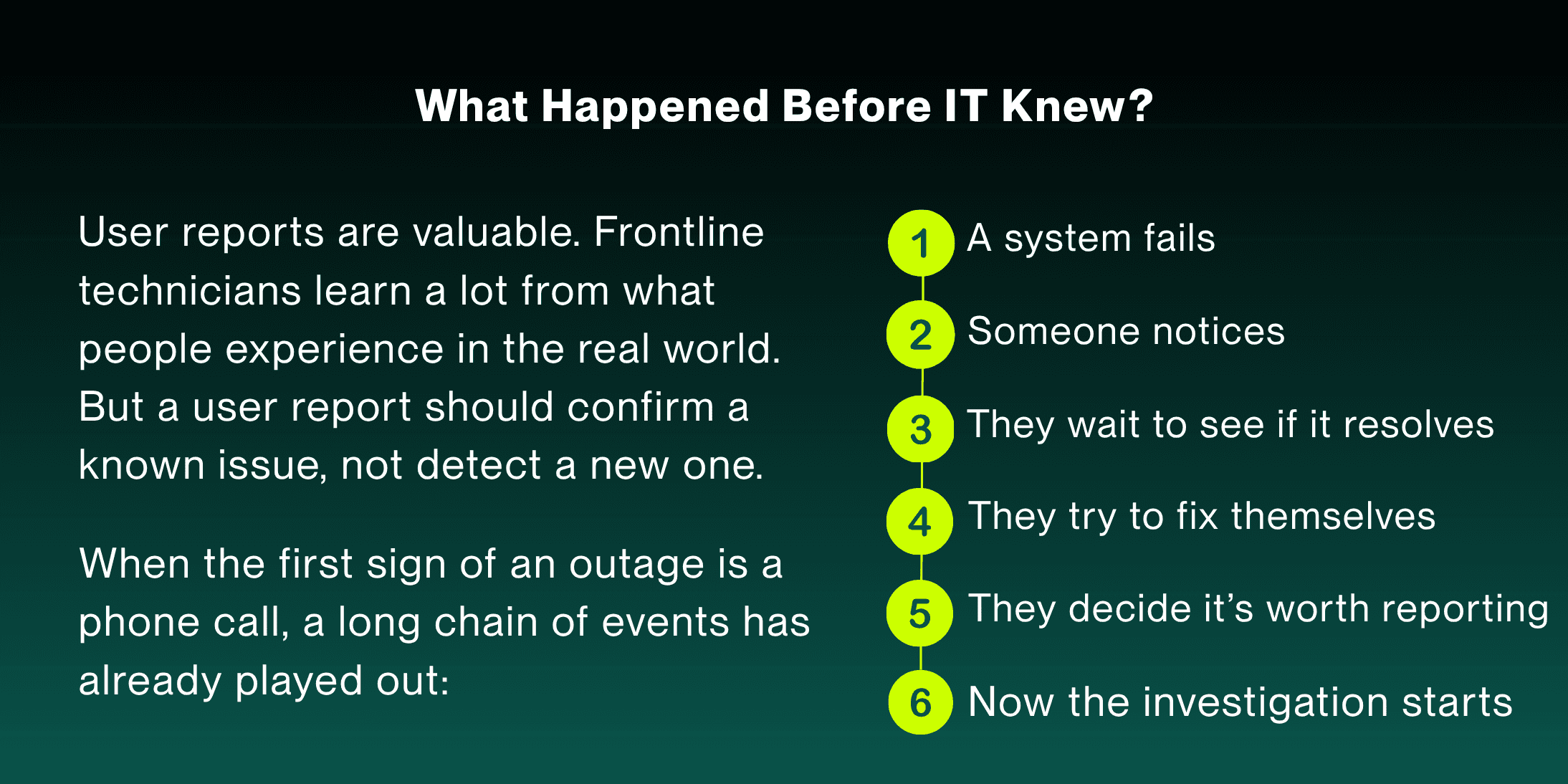
Six steps happen before a technician even gets a chance to respond. And every one of those steps adds time between when the problem started and when IT can do something about it.
BY THE NUMBERS: 80%
of data center operators say better management and processes would have prevented their most recent significant outage.
Most outages aren't a mystery. They're a visibility gap.
You don't fix that gap by hiring more people. You fix it by making sure your technicians aren't the last ones to find out.
Start With Business Impact, Not Technology
The easiest mistake a small IT team can make is treating monitoring as a coverage problem, trying to watch everything equally.
That leaves technicians staring at a wall of notifications, guessing which ones matter. That isn't proactive. It's just noisier reactive work.
Instead, ask a question that has nothing to do with technology:
What would the business notice first if it stopped working?
That question sorts your environment by impact instead of inventory size. An organization might run dozens of servers but depend on only three applications people truly cannot work without.
Those three deserve serious visibility.
Then ask the opposite question:
What could stop working and nobody would notice until they desperately needed it?
A backup job that stops running won't generate a single complaint, right up until someone needs to restore a file and discovers there's nothing to restore.
That's exactly why it deserves attention before anything visible breaks.
A useful monitoring strategy covers both:
What users would notice immediately.
And what they wouldn't notice until it was already too late.
Watch the Condition Before the Complaint

That means asking a different set of questions than “is it down?”
Is performance degrading?
Is capacity approaching a threshold?
Are errors trending up?
Is storage filling faster than expected?
Are backups actually completing?
Are devices dropping offline repeatedly?
Are authentication failures increasing?
A system doesn't have to be fully broken before it's worth a look.
The most valuable alert is often the one that gives your technician enough runway to fix something before a single person notices.
Want a real example of what this looks like day to day? The 99.9% of IT Nobody Notices walks through how small teams build that kind of visibility without adding headcount.
The Best Alert Is One Someone Can Act On
More alerts don't mean better monitoring.
If technicians get dozens of notifications a day and most require no action, they learn to tune it all out. It's a smoke alarm that goes off every time someone cooks dinner. Eventually, nobody jumps up, including for the fire that's real.
Every alert should answer three questions:
What happened? Why does it matter? What do I do next?
ALERT WITHOUT CONTEXT | ALERT WITH CONTEXT |
|---|---|
Server CPU exceeded 85%. | File server FS01 has exceeded 85% CPU for 15 consecutive minutes. Three related services are showing elevated response times. Investigate application performance. |
The second version tells a technician where to start. That context is what turns an alert into a head start instead of just more noise.
If an alert creates more investigative work than it eliminates, it isn't giving your technician much of a head start.
What Happens When the Alert Fires at 6:30 A.M.?
Monitoring only helps if someone knows what to do with what it finds. If an alert fires at 6:30 a.m., before anyone is in the office, your team shouldn't have to figure out who sees it, who owns the first response, or how long to wait before pulling someone else in.
Those decisions are much easier to make before something is already going wrong. For every critical alert, define who receives it, what requires escalation, how quickly someone needs to respond, and where ownership moves if the issue isn't resolved.
For a small team, that doesn't require a complicated incident management framework. It requires everyone knowing what happens next.
A technician shouldn't have to decide from scratch whether something is worth escalating or wonder if somebody else is already handling it. The alert should start the response, not a conversation about who is responsible for responding.
BY THE NUMBERS: 85%
of human error-related outages trace back to staff not following procedures, or to procedures that were flawed to begin with. A written escalation path closes that gap before it opens.
The Better Your Monitoring Gets, the Less Anyone Sees
Here's the strange thing about proactive IT: when it works, it can look like nothing happened.
Monitoring flags a failure at 6:30 a.m. Your team catches it, starts troubleshooting, and restores service by 7:15. Employees log in at 8:00 and start their day without a single call or ticket about the issue.
From a technician's seat, that's a clean proactive win. From everyone else's seat, it was just Tuesday.
That's the challenge with work that prevents disruption. A monitoring platform can tell your team something is wrong, but it can't make leadership see the problems your team kept from reaching the business.
That doesn't mean reporting every alert that fires. It means showing the pattern. If your team caught three potential outages this month before a single user noticed, that's worth reporting. So are recurring issues identified before they spread or failures corrected before they interrupted someone's work.
Those are the wins that show IT isn't just getting better at responding to problems. It's reducing how many problems the business ever has to experience.
Measure What Monitoring Prevents
Most support metrics measure what already happened. Monitoring gives you a rarer number: what didn't happen because your team caught it first. That includes incidents detected before a user ever called, recurring issues spotted through trends, and backup failures fixed before anyone needed a restore.
Preventative work can look, from the outside, like no work at all. If monitoring catches a failing disk before it takes down a server, the win is that nobody calls. That's not a quiet month. That's IT doing its job early enough that the business never felt it.
The same pattern shows up in your ticket queue, not just your alerts: the same fire, wearing a different ticket number. The Best Ticket Is the One You Never Receive Again breaks down why recurring issues keep coming back and the structural firebreaks that finally stop them.
Find Your Five Blind Spots
Don't start by auditing every device you own. Start with five.
This week, name the five systems your business would notice first if they failed.
For each one, ask:
Would we know it was failing before a user called?
Are we watching both availability and performance?
Would the alert tell a technician what actually needs attention?
Is there a clear owner if it fires?
Have we checked the alert history for a pattern?
Every “no” is a blind spot. And fixing it doesn't necessarily mean buying something.
Sometimes it's switching on a monitoring capability you already have. Sometimes it's adjusting a threshold, documenting a response, cleaning up an alert, or simply naming who owns it.
About the Author

Michelle Burnham has worked in and around the technology industry for nearly a decade; collaborating with IT support teams and contributing to technical documentation, service-oriented content, and operational communications. With a background in editing, formatting, and visual design, she specializes in translating complex ideas into clear, engaging content. In addition to her freelance creative work, she serves as a contract graphic designer, copywriter, and video editor for Helpt.
Every problem your users discover first is showing you where your visibility ends. Here's how to find those blind spots before they become tickets.
8 min read | IT Managers & Directors | Monitoring & Visibility
IN THIS ARTICLE
Why your first ticket is already late
Start with impact, not tech
Watch the condition before the complaint
Write alerts people can act on
Know what happens when an alert fires
Make the problems you prevent visible
Find your five blind spots
“Hey, is anyone else having this problem?”
That's not just a support request.
It's an alert your monitoring missed.
By the time the second person can't reach the shared drive or the third mentions the network has been slow all morning, IT isn't discovering the problem. You're discovering how long the business has already been living with it.
And for a lean IT team, that's the difference between getting ahead of an issue and spending the next few hours chasing it.
The goal isn't more monitoring. It's fewer surprises.
Because every issue a user discovers first is showing you exactly where your visibility ends.
What Happened Before IT Knew?
Six steps happen before a technician even gets a chance to respond. And every one of those steps adds time between when the problem started and when IT can do something about it.
BY THE NUMBERS: 80%
of data center operators say better management and processes would have prevented their most recent significant outage.
Most outages aren't a mystery. They're a visibility gap.
You don't fix that gap by hiring more people. You fix it by making sure your technicians aren't the last ones to find out.
Start With Business Impact, Not Technology
The easiest mistake a small IT team can make is treating monitoring as a coverage problem, trying to watch everything equally.
That leaves technicians staring at a wall of notifications, guessing which ones matter. That isn't proactive. It's just noisier reactive work.
Instead, ask a question that has nothing to do with technology:
What would the business notice first if it stopped working?
That question sorts your environment by impact instead of inventory size. An organization might run dozens of servers but depend on only three applications people truly cannot work without.
Those three deserve serious visibility.
Then ask the opposite question:
What could stop working and nobody would notice until they desperately needed it?
A backup job that stops running won't generate a single complaint, right up until someone needs to restore a file and discovers there's nothing to restore.
That's exactly why it deserves attention before anything visible breaks.
A useful monitoring strategy covers both:
What users would notice immediately.
And what they wouldn't notice until it was already too late.
Watch the Condition Before the Complaint
That means asking a different set of questions than “is it down?”
Is performance degrading?
Is capacity approaching a threshold?
Are errors trending up?
Is storage filling faster than expected?
Are backups actually completing?
Are devices dropping offline repeatedly?
Are authentication failures increasing?
A system doesn't have to be fully broken before it's worth a look.
The most valuable alert is often the one that gives your technician enough runway to fix something before a single person notices.
Want a real example of what this looks like day to day? The 99.9% of IT Nobody Notices walks through how small teams build that kind of visibility without adding headcount.
The Best Alert Is One Someone Can Act On
More alerts don't mean better monitoring.
If technicians get dozens of notifications a day and most require no action, they learn to tune it all out. It's a smoke alarm that goes off every time someone cooks dinner. Eventually, nobody jumps up, including for the fire that's real.
Every alert should answer three questions:
What happened? Why does it matter? What do I do next?
ALERT WITHOUT CONTEXT | ALERT WITH CONTEXT |
|---|---|
Server CPU exceeded 85%. | File server FS01 has exceeded 85% CPU for 15 consecutive minutes. Three related services are showing elevated response times. Investigate application performance. |
The second version tells a technician where to start. That context is what turns an alert into a head start instead of just more noise.
If an alert creates more investigative work than it eliminates, it isn't giving your technician much of a head start.
What Happens When the Alert Fires at 6:30 A.M.?
Monitoring only helps if someone knows what to do with what it finds. If an alert fires at 6:30 a.m., before anyone is in the office, your team shouldn't have to figure out who sees it, who owns the first response, or how long to wait before pulling someone else in.
Those decisions are much easier to make before something is already going wrong. For every critical alert, define who receives it, what requires escalation, how quickly someone needs to respond, and where ownership moves if the issue isn't resolved.
For a small team, that doesn't require a complicated incident management framework. It requires everyone knowing what happens next.
A technician shouldn't have to decide from scratch whether something is worth escalating or wonder if somebody else is already handling it. The alert should start the response, not a conversation about who is responsible for responding.
BY THE NUMBERS: 85%
of human error-related outages trace back to staff not following procedures, or to procedures that were flawed to begin with. A written escalation path closes that gap before it opens.
The Better Your Monitoring Gets, the Less Anyone Sees
Here's the strange thing about proactive IT: when it works, it can look like nothing happened.
Monitoring flags a failure at 6:30 a.m. Your team catches it, starts troubleshooting, and restores service by 7:15. Employees log in at 8:00 and start their day without a single call or ticket about the issue.
From a technician's seat, that's a clean proactive win. From everyone else's seat, it was just Tuesday.
That's the challenge with work that prevents disruption. A monitoring platform can tell your team something is wrong, but it can't make leadership see the problems your team kept from reaching the business.
That doesn't mean reporting every alert that fires. It means showing the pattern. If your team caught three potential outages this month before a single user noticed, that's worth reporting. So are recurring issues identified before they spread or failures corrected before they interrupted someone's work.
Those are the wins that show IT isn't just getting better at responding to problems. It's reducing how many problems the business ever has to experience.
Measure What Monitoring Prevents
Most support metrics measure what already happened. Monitoring gives you a rarer number: what didn't happen because your team caught it first. That includes incidents detected before a user ever called, recurring issues spotted through trends, and backup failures fixed before anyone needed a restore.
Preventative work can look, from the outside, like no work at all. If monitoring catches a failing disk before it takes down a server, the win is that nobody calls. That's not a quiet month. That's IT doing its job early enough that the business never felt it.
The same pattern shows up in your ticket queue, not just your alerts: the same fire, wearing a different ticket number. The Best Ticket Is the One You Never Receive Again breaks down why recurring issues keep coming back and the structural firebreaks that finally stop them.
Find Your Five Blind Spots
Don't start by auditing every device you own. Start with five.
This week, name the five systems your business would notice first if they failed.
For each one, ask:
Would we know it was failing before a user called?
Are we watching both availability and performance?
Would the alert tell a technician what actually needs attention?
Is there a clear owner if it fires?
Have we checked the alert history for a pattern?
Every “no” is a blind spot. And fixing it doesn't necessarily mean buying something.
Sometimes it's switching on a monitoring capability you already have. Sometimes it's adjusting a threshold, documenting a response, cleaning up an alert, or simply naming who owns it.
About the Author
Michelle Burnham has worked in and around the technology industry for nearly a decade; collaborating with IT support teams and contributing to technical documentation, service-oriented content, and operational communications. With a background in editing, formatting, and visual design, she specializes in translating complex ideas into clear, engaging content. In addition to her freelance creative work, she serves as a contract graphic designer, copywriter, and video editor for Helpt.
Stop Answering Calls.
Start Driving Growth.
Let Helpt's US-based technicians handle your support calls 24x7 while your team focuses on what matters most.
Stop Answering Calls.
Start Driving Growth.
Let Helpt's US-based technicians handle your support calls 24x7 while your team focuses on what matters most.
Stop Answering Calls.
Start Driving Growth.
Let Helpt's US-based technicians handle your support calls 24x7 while your team focuses on what matters most.
©2026 Helpt, a part of PAG Technology Inc. All Rights Reserved.